In SupportLogic, Unreplied Cases are open support cases where the customer has reached out (via an inbound message, comment, or case creation) and is currently waiting for an agent's response.
Prolonged customer wait times are a leading indicator of frustration and escalation risk. Identifying unreplied cases enables frontline managers and engineers to address stalled conversations before SLAs breach or negative sentiment develops.
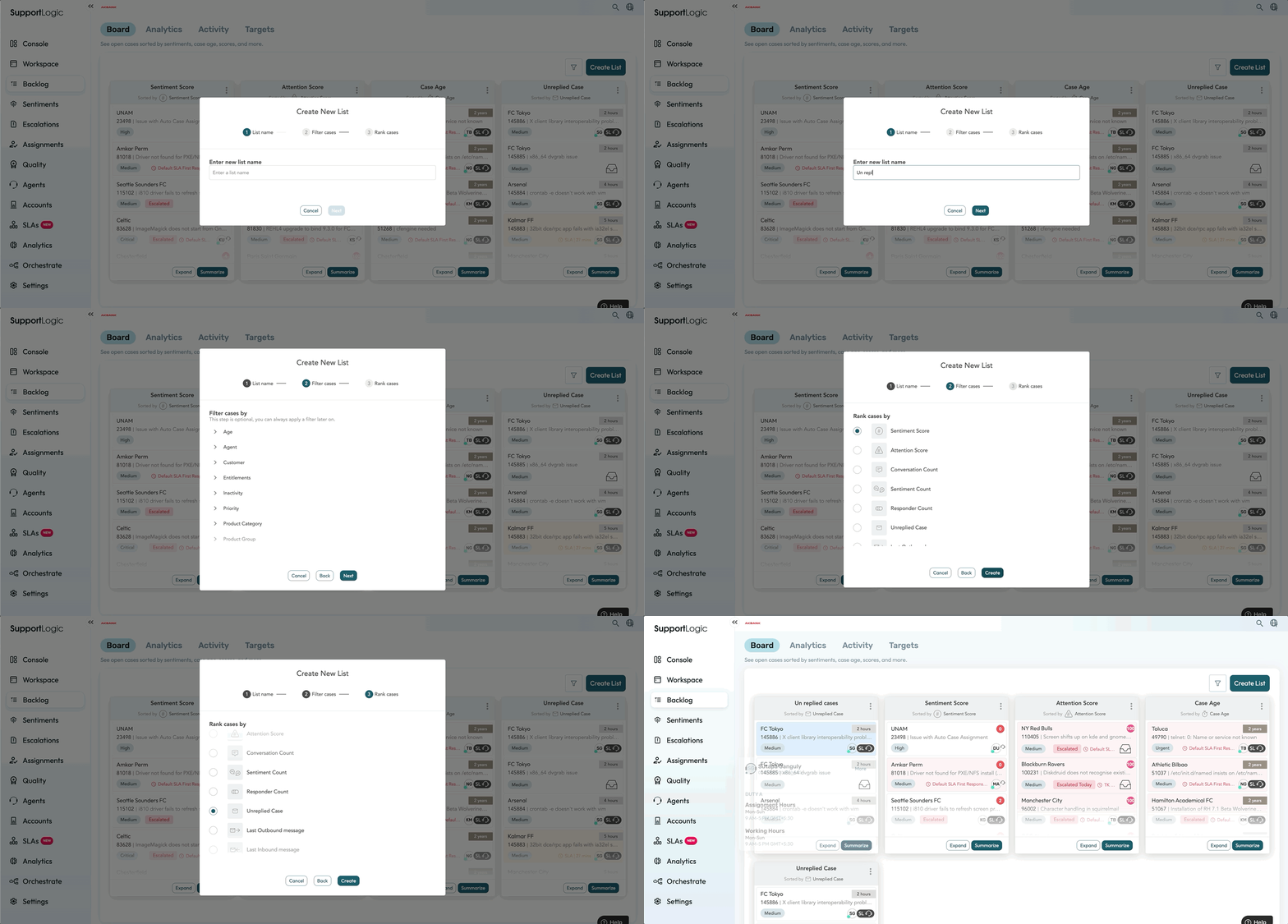
You can view the list of un-replied cases under the Backlog >> Board page by creating a new case list. Click on the create list >> Enter the list name >> select the filter (Optional ) >> choose Unreplied cases. You will be able to edit this list as per your requirement.
Cases are ranked by elapsed wait time, highlighting those waiting longest for an engineer. You can apply AI Case Cohort Summarization to the list by clicking on "Summarize" to spot common themes or product areas causing response bottlenecks.
Set up Proactive Alerts for Unreplied Cases - Create or customize alerts using Case Activity Metrics(eg: Trigger on Last Case Activity where Outbound exceeds team SLO targets (e.g., > 4 business hours)). Combining with Urgency, Frustration, or Follow-up Request signals will help to prioritize high-risk unreplied tickets.
Was this article helpful?
That’s Great!
Thank you for your feedback
Sorry! We couldn't be helpful
Thank you for your feedback
Feedback sent
We appreciate your effort and will try to fix the article