Purpose
To explain the process of temporarily swapping an engineer from one shift to another (e.g., from PST to EMEA) for a specific day due to agent unavailability.
Description
In scenarios where an engineer assigned to a particular shift (e.g., EMEA) is unavailable on a given day, and coverage is required, another engineer from a different shift (e.g., PST) can be temporarily reassigned.
However, due to the current design of the system, directly adding the PST-shift engineer to the existing EMEA shift would assign them to the entire week's shift, which is not the intended behavior.
To avoid this, follow the steps below to swap engineers for a single day only:
Steps to Perform the Swap
1. Create a New "One-Day EMEA Shift"
Go to the Shift Management section.
- Do not modify the existing EMEA shift (the original agent is already marked OOO).
- Create a new EMEA shift entry specifically for the date when the EMEA engineer is unavailable.
Set the correct time zone and shift hours for EMEA.
Ensure that the shift is set only for the specific date, not recurring.

2. Add the PST Engineer to the New EMEA Shift
In the newly created one-day EMEA shift, add the PST engineer who will be covering for the EMEA shift.
This ensures the PST engineer will be considered for case assignment only during EMEA hours on that specific day.
3. Mark the PST Engineer as OOO for Their Original Shift
Navigate to the Out-of-Office (OOO) settings.
Set the PST engineer as OOO during their usual PST shift for that same day.
This prevents the system from assigning them cases during their regular PST hours.
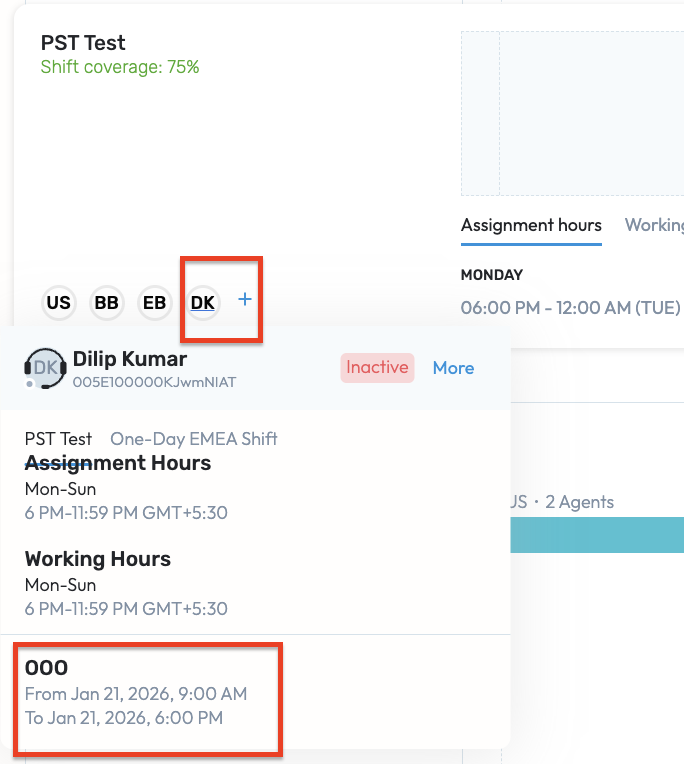
With the above configuration:
The PST engineer will receive case assignments during the EMEA hours only on the specific day.
Their original PST shift will remain unassigned due to the OOO status.
The EMEA shift is covered without affecting weekly shift assignments.
Notes
Avoid modifying the existing shift structure for permanent engineers.
Ensure the new shift is clearly named or documented to indicate it's for coverage purposes.
This method allows clean, day-specific coverage without impacting the broader weekly schedule.
Was this article helpful?
That’s Great!
Thank you for your feedback
Sorry! We couldn't be helpful
Thank you for your feedback
Feedback sent
We appreciate your effort and will try to fix the article