Overview
This article explains how Active Time is measured in SupportLogic and clarifies which activities count toward this metric. This helps users better understand how their engagement is tracked within the platform.
What Is Active Time?
Active Time represents the amount of time a user is actively interacting with the SupportLogic application.
It is not based on how long a user is logged in, but rather on measurable actions performed within the platform.
Activities that count toward Active Time include actions such as:
Navigating between different SupportLogic pages
Reviewing or acknowledging signals and sentiments
Interacting with case insights
Performing actions within any SupportLogic module
Engaging with UI components or workflows inside the application
In short, Active Time reflects actual engagement, not passive login duration.
Does Work Done in CRM Count Toward Active Time?
No. Active Time is measured only for interactions performed within the SupportLogic application.
If you use the “Open in CRM” option:
SupportLogic opens the case in a new Salesforce (or other CRM) tab
Any time spent reviewing, editing, or working on that case in the CRM does not count toward SupportLogic Active Time
Only actions performed inside SupportLogic contribute to the metric.
Where Can Active Time Be Tracked in SupportLogic?
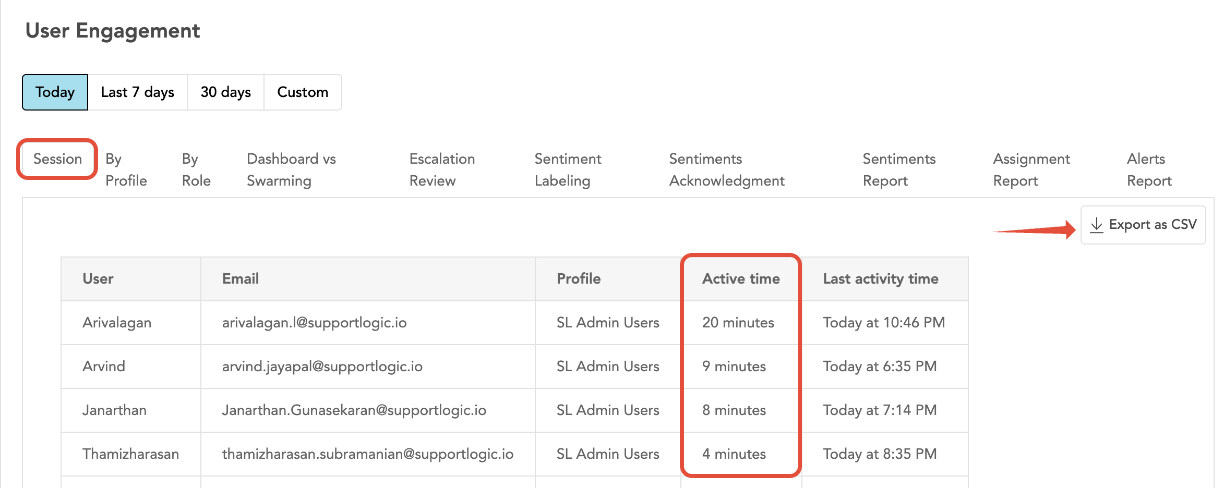
You can view Active Time in the User Engagement Metrics section of SupportLogic.
To access it:
Navigate to Control Center
Go to User Management
Under Session Tab
Key Points to Remember
Being logged in for several hours does not equal Active Time
Active Time increases only when you interact with SupportLogic features
Time spent in external systems (e.g., Salesforce, Zendesk), even if opened from SupportLogic, is not included
Active Time = Measured engagement inside SupportLogic, not overall work time.
Was this article helpful?
That’s Great!
Thank you for your feedback
Sorry! We couldn't be helpful
Thank you for your feedback
Feedback sent
We appreciate your effort and will try to fix the article