Core SX
- Active escalation summarization in the New SupportHub (Core Premium version)
- Auto-Sync Agents and Accounts from CRM
- Write back LTE summarization for all CRMs
- Case Cohort actionable insights review
Assign
- Reassign Workflow Added to the New Support Hub
- Agent availability from the custom field within ServiceNow CRM
Assist
- Issue Resolution Agentic Workflow
- Ambiguous Cases requiring customer follow-up to get clarity on the reported issue
Expand
- Account Cohort actionable insights review
Elevate
- AutoQA - GenAI Behaviours with Reason statements & Coaching feedback BETA
- AutoQA Insights - v2
- Create Assignment form - New UI
- Core Signals - Highlighting within Chat/Voice transcripts
Changes/Updates
- New SupportHub: performance optimization
- SLA Metrics Added to Escalation Prediction Model
- Case Injection Optimization to reduce auto-assignment time
Thanks
The SupportLogic Team
_____________________________________________________________________________________
Core
Active escalation summarization in the New SupportHub (Core Premium version)
Important: Available exclusively on the New Support Hub page.
Important: This is a premium package feature.
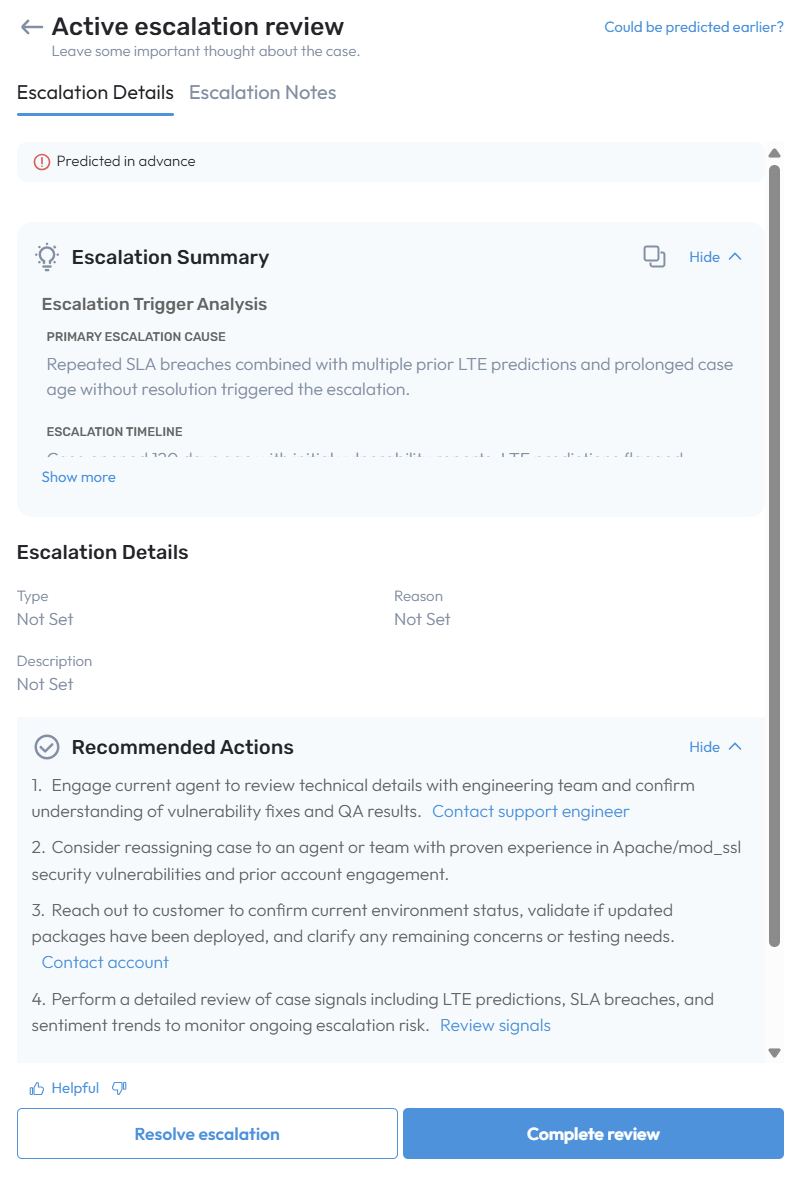
The Premium package now includes an AI-driven Active Escalation Summary and Recommended Actions experience.
Introduces an AI-driven summary that provides real-time insights into:
Escalation trigger and timeline
Severity factors and critical blockers
Agent resource/expertise gaps
Relevant account context
Generates actionable recommended steps to help resolve the escalation more efficiently.
Includes one-click actions (reply to customer, add agent comments, review case insights, etc.).
Summary and recommendations refresh automatically each time the workflow is opened, ensuring guidance reflects the latest case facts.
Auto-Sync Agents and Accounts from CRM
Important: Require the SL support team to enable.
Agents and accounts can now be automatically synced directly from CRM metadata, without relying on cases for data ingestion.
Agents refer to both the agent users and the contact users.
New agents and customers can be added and searchable before any cases are created or assigned to them.
Support Managers can verify and manage assignment queue configurations and virtual teams/accounts by adding or removing agents and accounts, even if no cases are currently linked to those agents or accounts.
The system now supports the ingestion of accounts and agents that do not yet have existing cases.
Currently available for SFDC only.
Write back LTE summarization for all CRMs
Write-back of Likely to Escalate (LTE) summarization is now available for Premium customers on UWF and is supported across all CRM types.
Once enabled, the system will automatically write back an LTE summary each time a new prediction is generated. If a case receives multiple predictions, a separate summary will be written for each prediction.
Case Cohort actionable insights review
While the Case Cohort summary provides a consolidated view of emerging patterns, high-impact issues, sentiment risks, and escalation drivers within the cohort, the Possible Next Steps delivers an actionable workflow that helps users efficiently review & manage escalations and churn.
Provides prioritized, actionable recommendations to streamline follow-up and improve resolution.
Supports one-click actions such as review High Impact Issues, Agent Review, and Review Churn.
Recommendations refresh automatically with every workflow session, ensuring insights reflect the latest case updates.
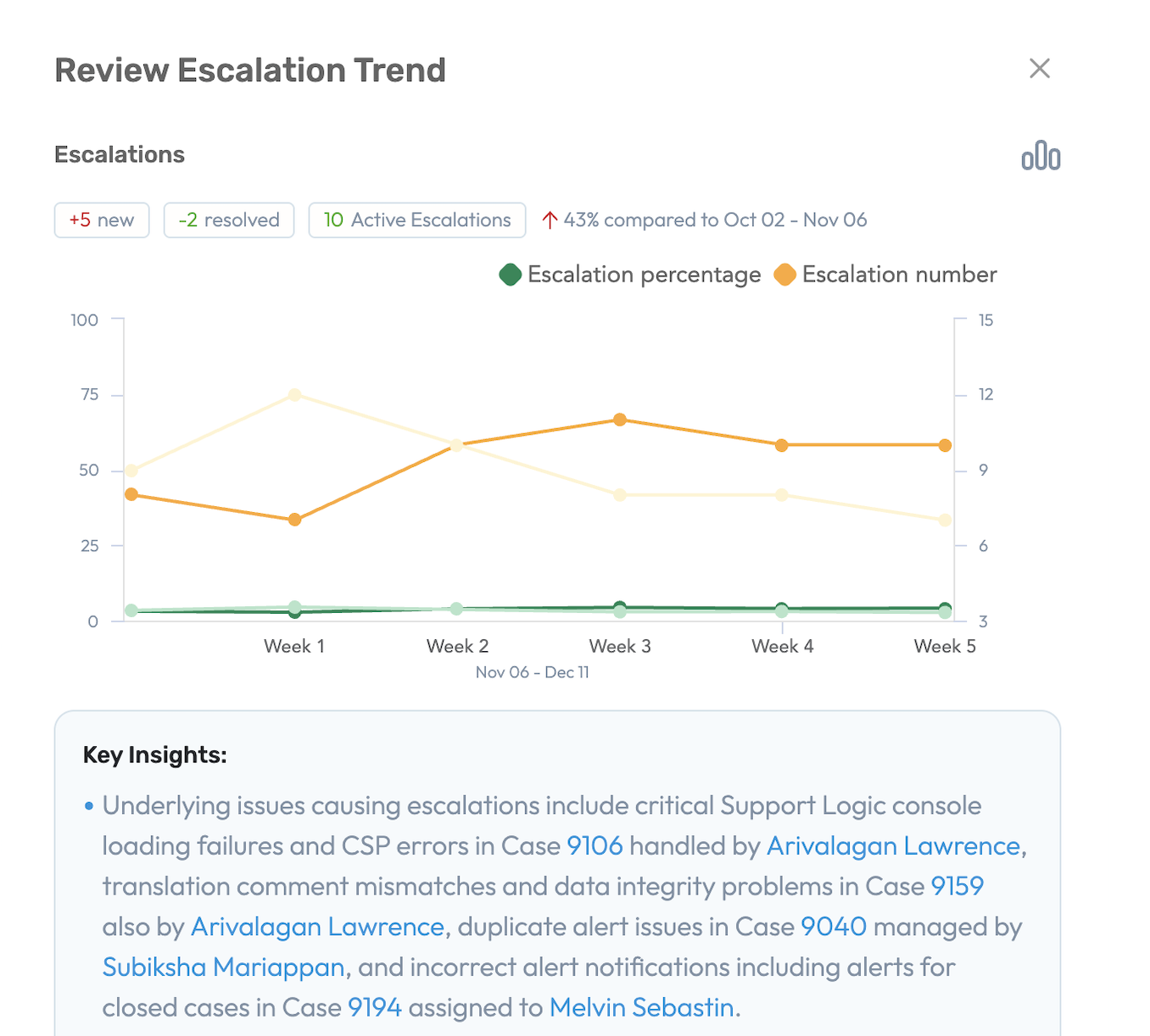
Review Escalation
Enables users to quickly assess active and new escalations, understand underlying root causes, and leverage ML-driven insights that surface key patterns and recommended actions.
5-week trend graph highlights shifts in escalation volume and spikes in new cases.
Key Insights consolidate relevant cases with technical root-cause indicators.
The impacted accounts view provides a message icon that allows users to quickly send updates to the respective account owners about critical issues
Review Churn
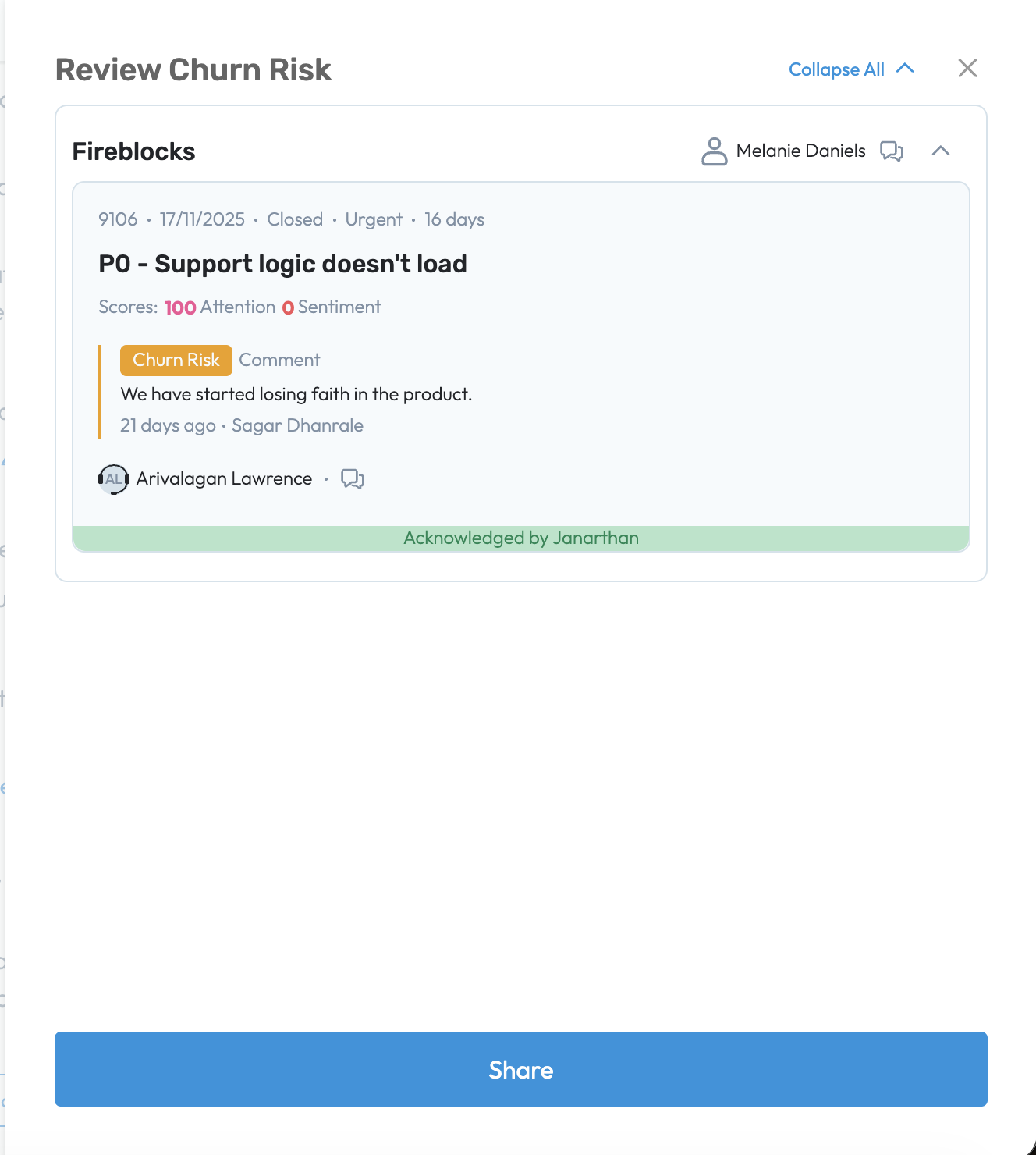
Identifies and analyzes cases tagged with a churn flag that may contribute to potential account churn. It highlights the most relevant churn-risk cases along with the underlying churn reason, whether surfaced by ML or derived from added churn comments by an agent during customer interactions. The workflow also allows users to share these cases directly with account owners, enabling proactive follow up and faster resolution.
Review High-Impact Issues
Important Available for customers with ICA, XFind, and Elevate enabled
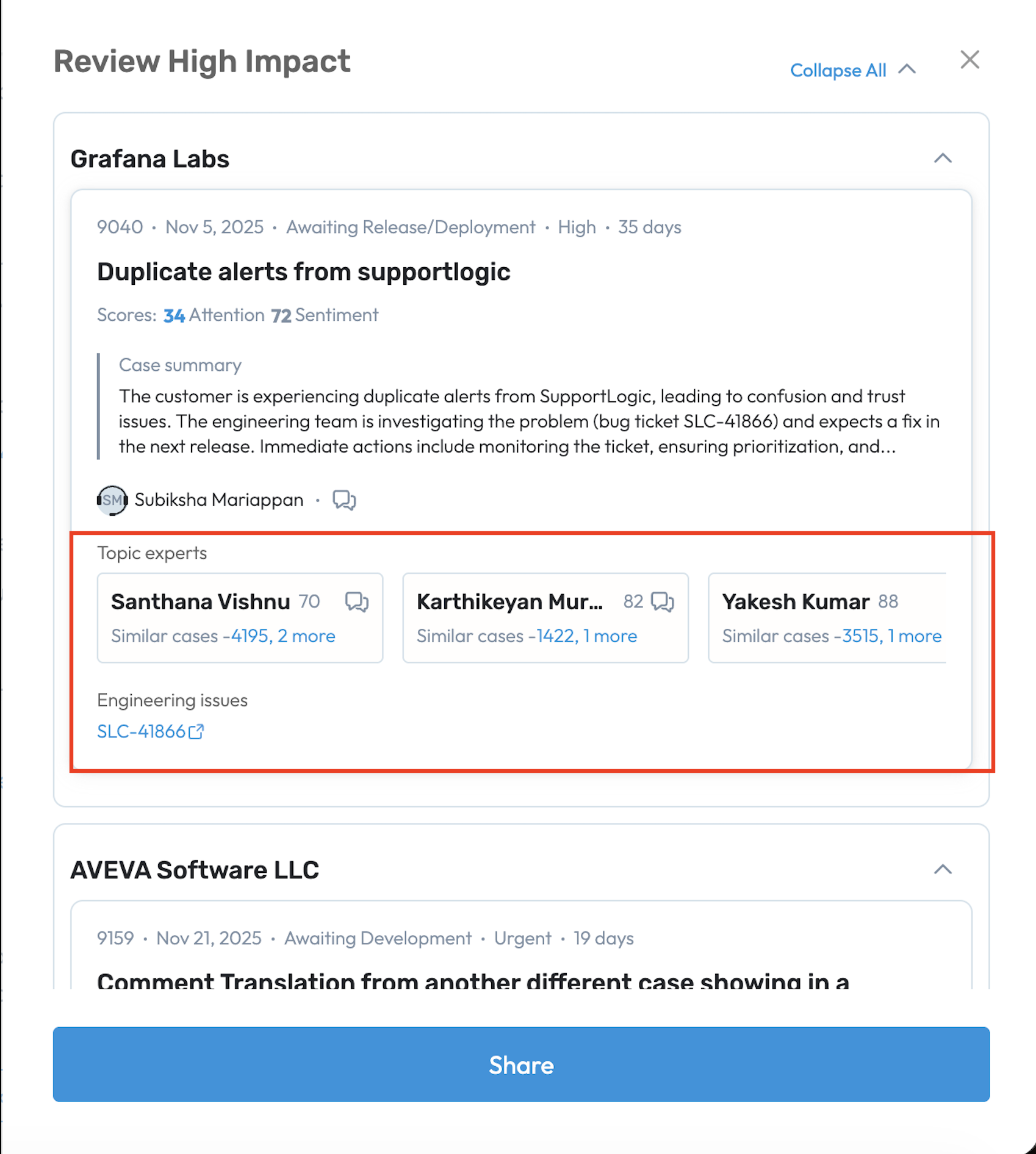
The workflow enables users review high-impact issues easily. Each case card offers a clear summary of the customer problem and the current engineering status. The workflow suggests the most relevant topic experts based on their experience with similar cases, making it simple to find the right expertise. If XFind is not enabled, experts are recommended using ICA skill-match scores.
Additionally, users can access related engineering artifacts, such as linked JIRA tickets, to gain full context on technical dependencies and take timely, informed actions.
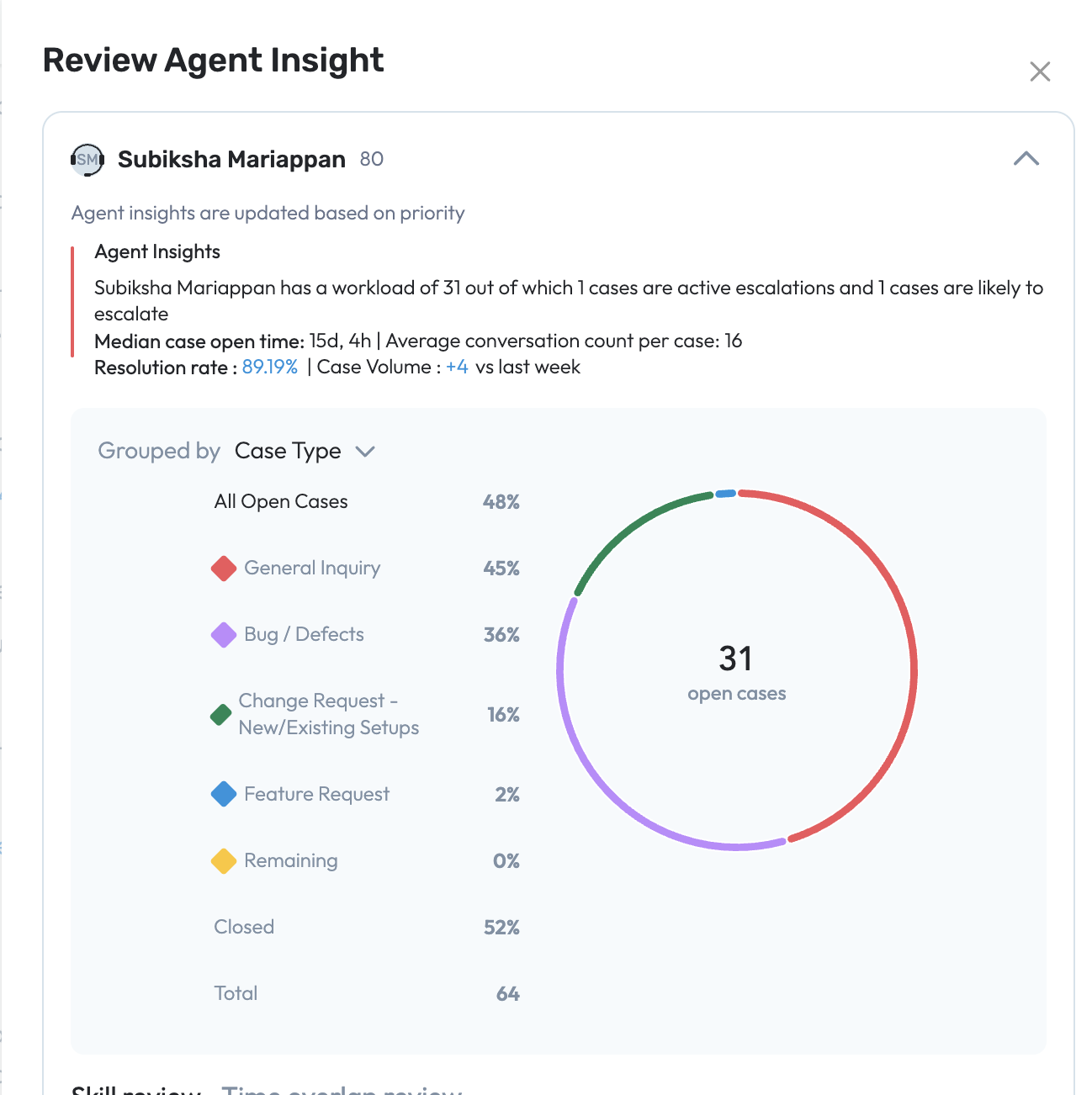
Review Agent Insights
Quickly assess agent performance, workload, and operational efficiency.
Each agent card provides a snapshot of case volume, median open time, resolution rates, and conversation patterns.
Visualize workloads by status, priority, or other attributes to identify high-performing agents and potential bottlenecks.
Review Expansion
Prioritize high-value accounts with the Review expansion and Watchlist workflows.
Identify accounts with strong positive sentiment signals for upsell/expansion opportunities.
Surface early warning signals of churn to maintain a balanced approach between growth and retention.
Assign
Reassign Workflow Added to the New Support Hub
A new Reassign workflow has been introduced in the New Support Hub. This workflow evaluates the currently assigned agent against other available agents using the agent assignment recommendation algorithm and calculates an overall match percentage. When a better-matched agent is identified, the Reassignment AI Agent will suggest reviewing the recommendation and reassigning the case when appropriate.
This workflow is now available in the New Support Hub within the Active Tasks list, as well as in the Likely to Escalate and Active Escalation workflows. The Reassignment AI Agent continuously monitors available agents and supports managers in selecting the best agent to drive faster case resolution and improve overall customer satisfaction.

Agent availability from the custom field within ServiceNow CRM
Enables the direct retrieval of agent availability from the customer’s custom CRM field for case assignment and agent tooltips.
Customers define a custom CRM field on the User object indicating agent availability (True = not available, False = available).
This field is mapped via UWF mapping to the SupportLogic schema and used through the SupportLogic API.
The assignment process proceeds as usual, leveraging Recommended Agents, capacity limits, and other ICA components.
Removes the need to manage Shifts and Out-of-Office (OOO) calendars within SupportLogic.
Available now for ServiceNow CRM customers.
Assist
Issue Resolution Agentic Workflow BETA
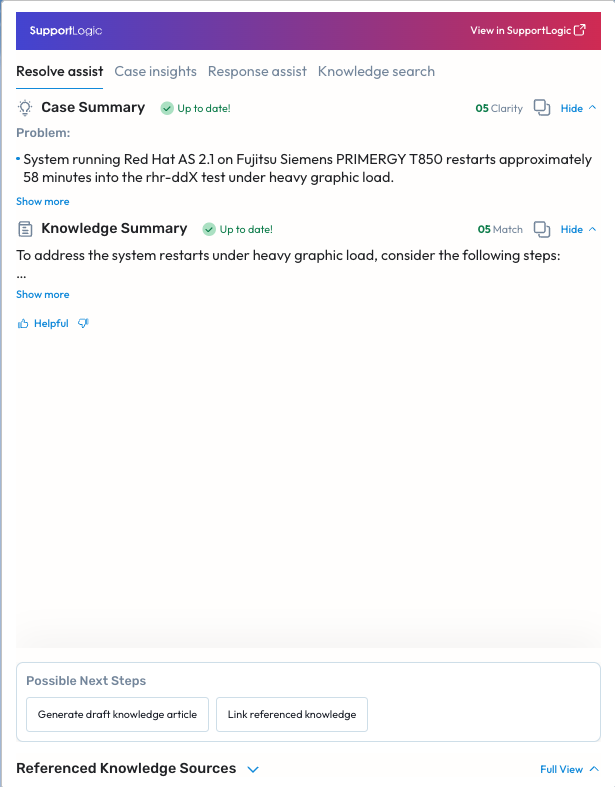
The Issue Resolution Agentic AI Workflow transforms how Support Engineers resolve customer issues. By orchestrating a network of intelligent AI agents, it automates repetitive tasks, accelerates time to resolution, and empowers support professionals to focus on higher-value, complex problem-solving — all while keeping the human-in-the-loop for accuracy and control. The key capabilities are as follows:
Automated Case Review & Response - A team of AI agents autonomously review new cases & case updates, summarise cases including incremental updates, check all the knowledge sources including past cases, and drafts customer-ready responses — saving valuable time and ensuring quality communication.
Smart Human-in-the-Loop Orchestration - Support Engineers review AI-drafted responses and approve with a click, maintaining oversight while reducing manual effort.
Adaptive Case Handling - Whether it’s a simple issue with a known answer or a complex problem needing troubleshooting, the agentic workflow dynamically adapts:
Simple Cases → Auto-drafts high-confidence customer replies
Ambiguous Cases → Drafts clarification or follow-up questions
Complex Cases → Suggests triage steps and recommends similar resolutions
Knowledge Creation and Linkage - Every resolved case becomes a learning opportunity — the system generates draft Knowledge Articles for quick approval, ensuring valuable insights are captured and reused.
Automated Follow-ups & Closure - The agentic workflow automatically generates customer follow-ups after providing a solution to an issue — all with configurable thresholds.
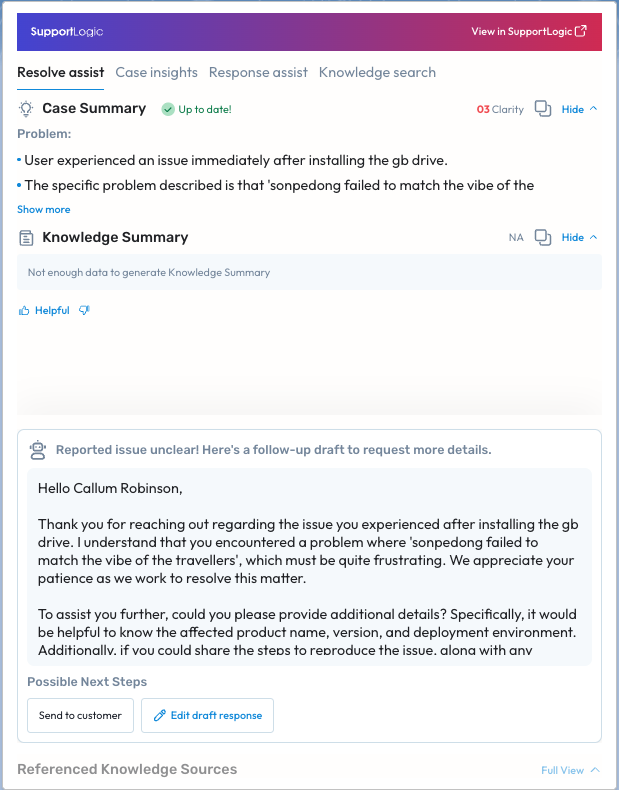
Ambiguous Cases requiring customer follow-up to get clarity on the reported issue
The summarization agent determines the clarity score based on the case title, description and comments. If clarity score is low, the response agent generates a follow-up draft to be sent to the customer, seeking for additional details. The Support Engineer can quickly review the follow-up draft, edit it if required, and send the response to customer. The knowledge agent is not invoked until the issue clarity improves. This ensures that the knowledge recommendation is meaningful and case is scrubbed before engaging a Support Engineer to troubleshoot.
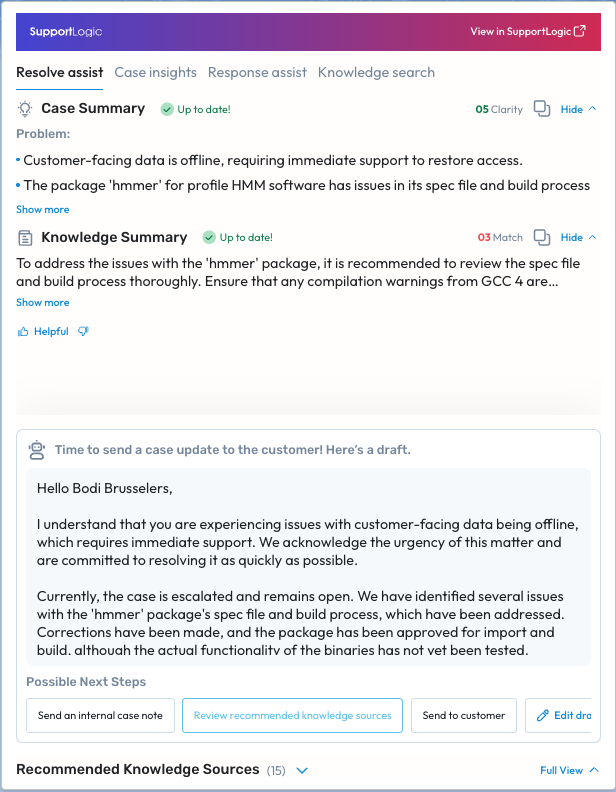
Complex Cases requiring troubleshooting
Sometimes, there is no straightforward solution available for the reported issue. In such cases, the knowledge agent aids the Support Engineer by recommending knowledge sources to consult for troubleshooting. Meanwhile, the response agent generates a draft customer update as the follow-up response SLA approaches.
Cases with a potential solution
The knowledge agent uses the evolving case context to identify answers across multiple dynamic knowledge sources. Sometimes, a high-match answer is available immediately when the case is created. In other situations, the high-match answer may only surface after several follow-up conversations—either internally with support/engineering teams or externally with the customer.
In both scenarios, the recommended solution may require action from either the support engineer or the customer. Based on this, the response agent generates a draft update for the customer, either explaining the actions the support engineer will take or providing detailed instructions for the actions the customer needs to perform.
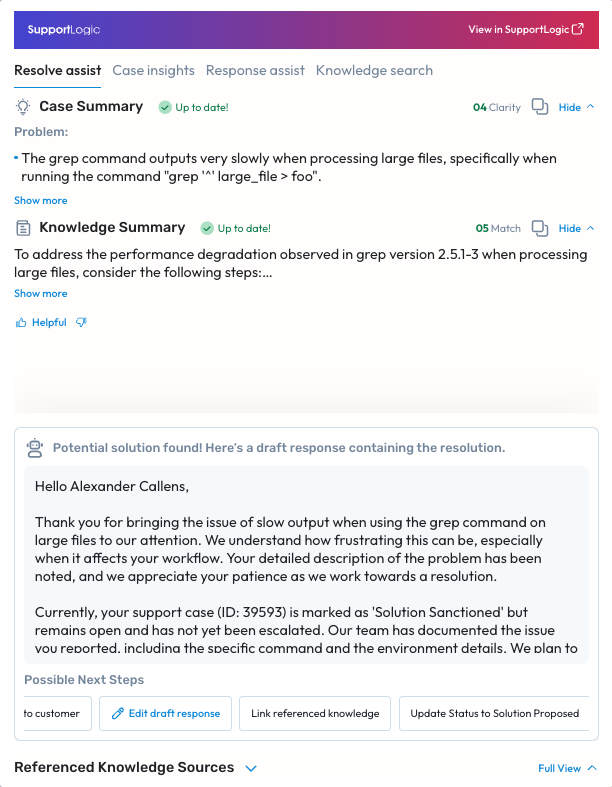
The Support Engineer has the option to change the case status to solution proposed if the potential solution offered is viable. Subsequently the knowledge agent aids Support Engineer to capture the case resolution in a knowledge article. The issue resolution agentic workflow also automates the routine tasks like following up with customer about the solution offered and closing the case based on configured time windows.
Expand
Account Cohort actionable insights review
The Account Cohort Summary offers a consolidated view of account health by highlighting open-case load, escalations, high-priority issues, and accounts that require focused follow-up. It also surfaces watchlist accounts, key risk indicators, and emerging support patterns, enabling teams to quickly identify accounts that require attention.
These insights flow directly into the Next Steps, which provides an actionable workflow to help users efficiently review and manage escalations, churn risks, agent insights, and expansion opportunities.
Delivers prioritized, action-ready recommendations to streamline follow-up and improve workflows
Supports one-click actions such as Review Escalations, Review Churn Risk, Review Agent Insights, Review Watchlist
Updates automatically with each workflow session to reflect the latest account activity.
Review Escalation
Enables users to quickly assess active and new escalations, understand underlying root causes, and leverage ML-driven insights that surface key patterns and recommended actions. A 5-week trend graph highlights shifts in escalation volume and spikes in new cases. Key Insights consolidate the most relevant cases with technical root-cause indicators, and the impacted-accounts view enables quick notification of account owners about critical issues requiring attention
Review Churn
Identifies and analyzes cases tagged with a churn flag that may contribute to potential account churn. It highlights the most relevant churn-risk cases along with the underlying churn reason, whether surfaced by ML or derived from added churn comments by an agent during customer interactions. The workflow also allows users to share these cases directly with account owners, enabling proactive follow up and faster resolution.
Review Agent Insights
Quickly assess agent performance, workload, and operational efficiency with actionable insights. Each agent card provides a snapshot of case volume, median open time, resolution rates, and conversation patterns. Visualize workloads by status, priority, or other attributes to identify high-performing agents, detect potential bottlenecks, and make data-driven decisions that optimize team performance
Review Watchlist
Prioritize high-value accounts and take proactive actions to drive expansion. The workflow allows to Identify accounts with strong positive sentiment signal indicators to identify upsell or expansion opportunities. At the same time, surface early warning signals of churn to maintain a balanced approach between growth and retention
Elevate
AutoQA - GenAI Behaviours with Reason statements & Coaching feedback BETA
We heard you - and now, AutoQA is going to provide not just a grading but also a generated reason statement that goes into the why behind a grade. Additionally, when the grade provided is Negative, the output also includes an additional sentence that provides specific coaching/ feedback that helps your agents understand what should’ve been done or said to get a Positive grading. These new behaviours are GenAI powered and hence extremely sophisticated and accurate.
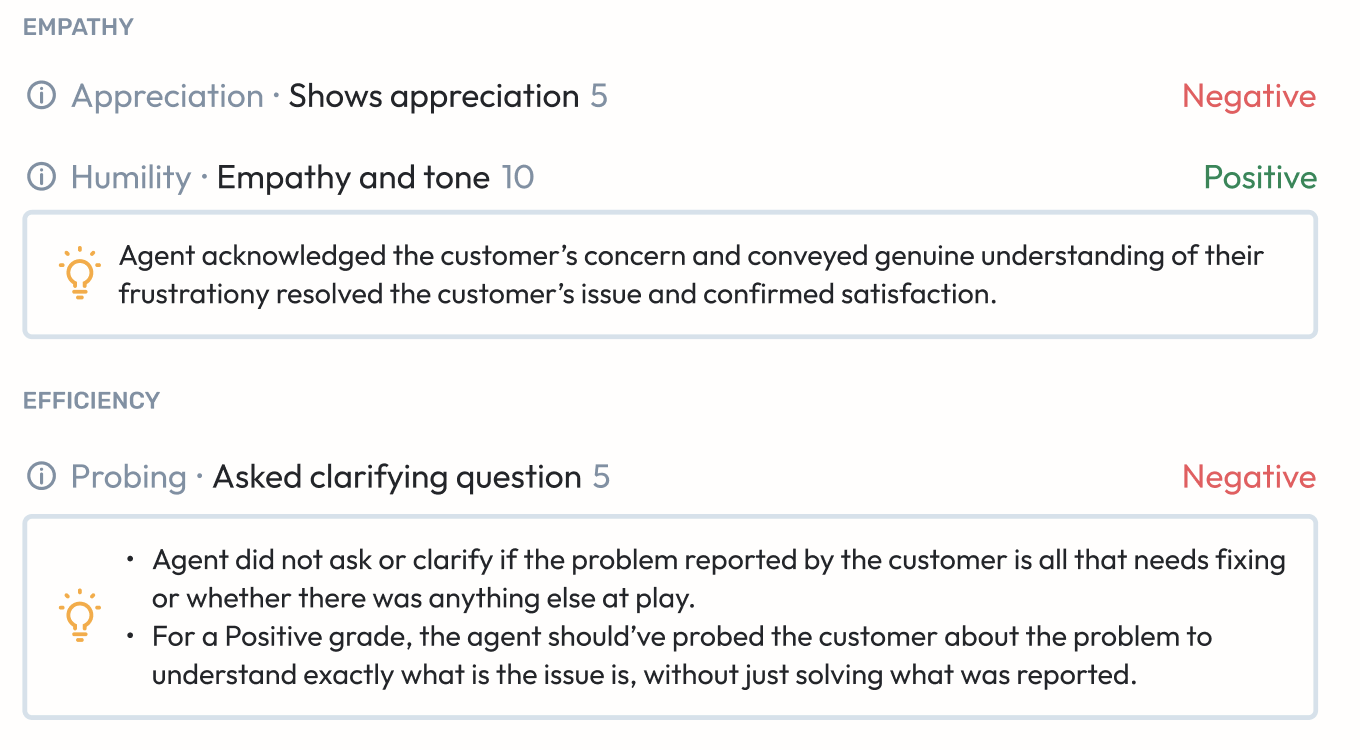
This is being done incrementally and the first two behaviours that we’ve readied up for this release are - Humility and Resolution.
AutoQA Insights - v2
If you have read the help article on the all-new AutoQA Insights page, you know that we’d planned for some additional features and enhancements to come to the page .. well, most of those are here!
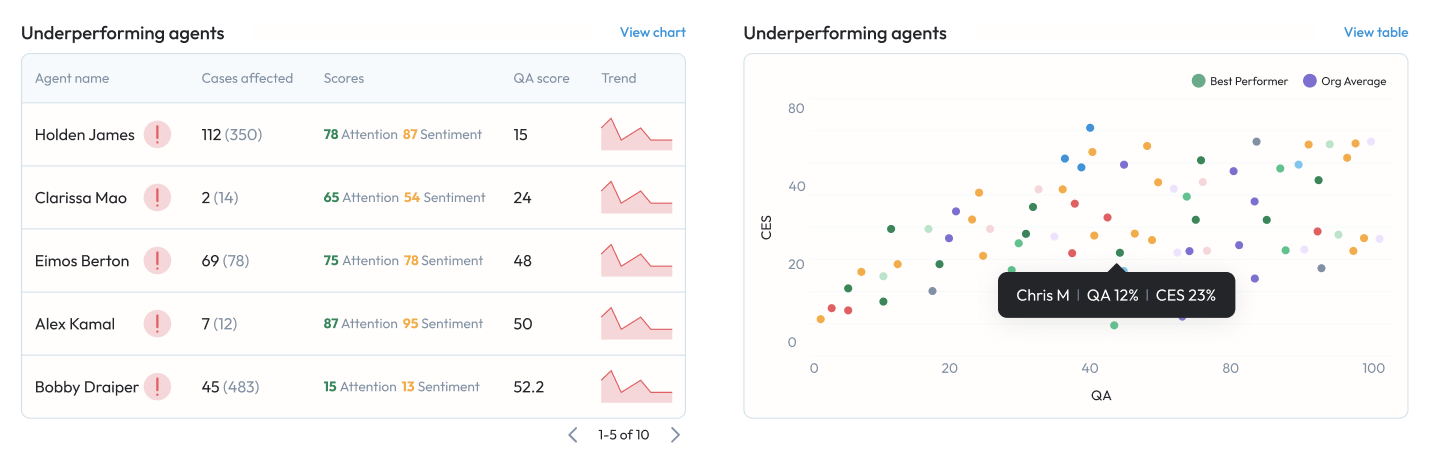
Tables/Charts - For each table within the page, we’ve planned a chart to help you easily understand the performance and metrics that are being highlighted. In this release, we’ve got 4/7 charts ready
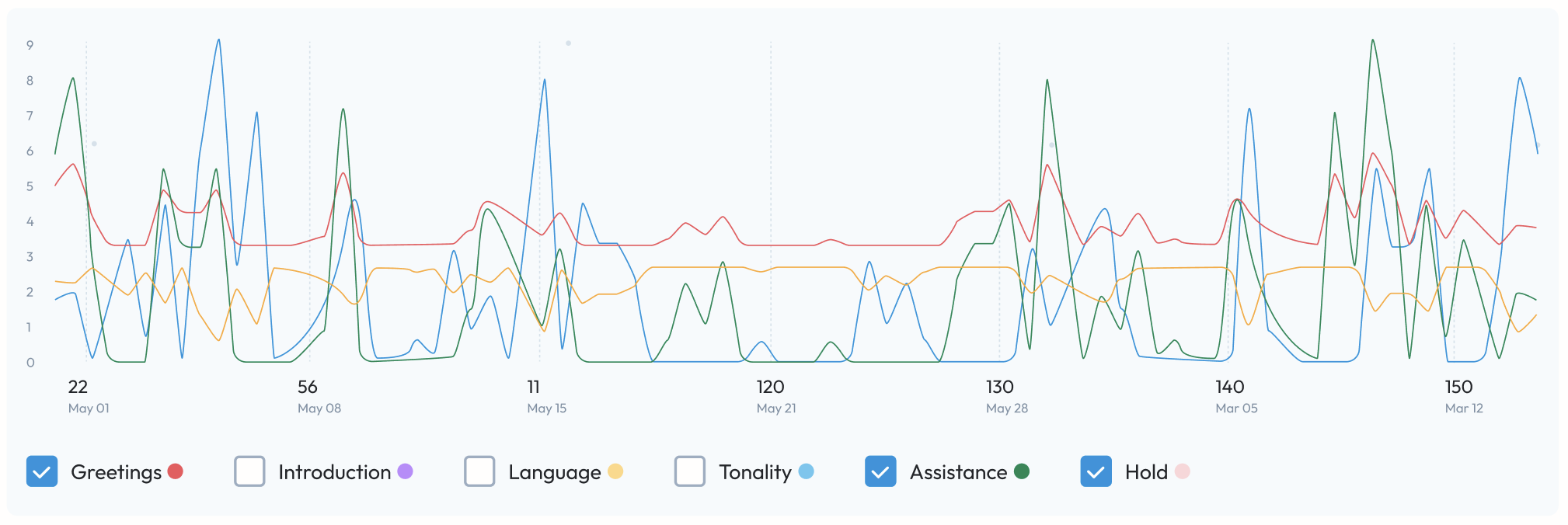
Skill/Behaviour trends - For the first time ever within Elevate, we’ve now provided you with trend line charts that allow you to visualise performances for singluar Skills or Behaviours instead of the overall QA score.
Stay tuned for the next release where we close out all the planned enhancements for this page.
Create Assignment form - New UI
Continuing with our redesign efforts - the newest page(s) that we have to offer is the Create Assignment page - both for QA Assignments and Calibration assignments.
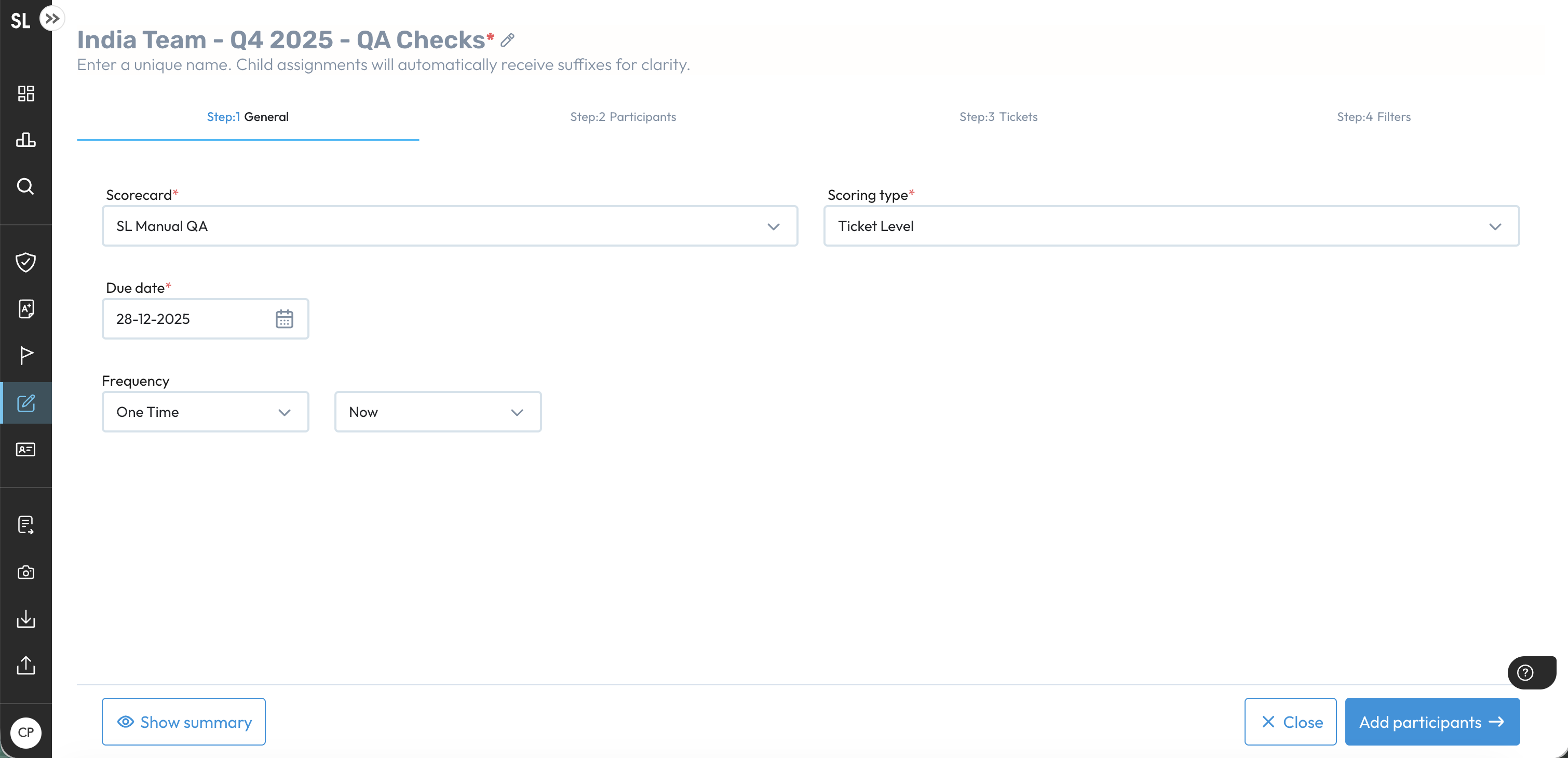
We’ve aimed to keep the functionality the same, with some enhancements obviously, and its just the UI that’s changed - so you can hit the ground running.
Core Signals - Highlighting within Chat/Voice transcripts
Previously we released the ability to view Core’s signal hgihlights within Elevate and even filters for the same that would help use these signals in workflows within Elevate. However, there was one gap - these highlights were not being shown within Chat and Voice transcripts.
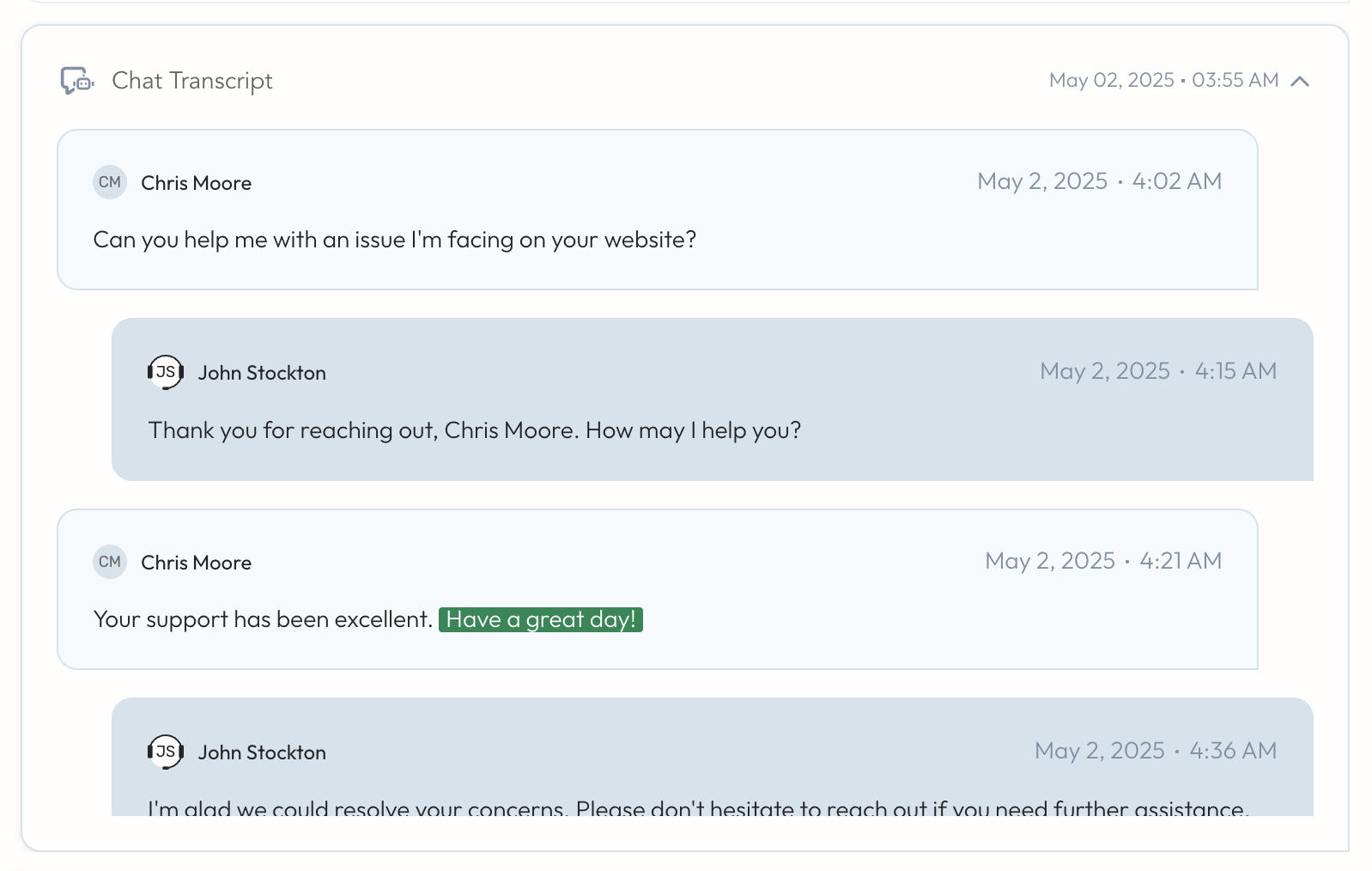
This has now been resolved and you will now be seeing highlights within transcripts.
Changes/Updates
New SupportHub: performance optimization
Multiple optimizations have been implemented in the New Support Hub to significantly improve page performance. The following user actions now show measurable improvements:
Opening the New Support Hub
Scrolling through the timeline
Navigating the timeline by clicking signals
Adding annotations and scrolling through them
Opening the next or previous Support Hub page
Closing a case and returning to the Console page
Overall, these enhancements have resulted in a substantial reduction in load times—up to a 900% improvement in some scenarios, with loading times dropping from approximately a minute to around 5-7 seconds.
SLA Metrics Added to Escalation Prediction Model
The escalation prediction model now incorporates three SLA metrics - First Response Time, Follow-Up Response Time, and Case Resolution Time - as part of its evaluation.
Early results show slight performance improvements across several customers.
Going forward, all LTE models will continue to be retrained on their regular monthly cadence, now including missed SLA data.
If the updated models demonstrate improved recall, the enhanced LTE version will be automatically released to customers as part of the monthly retraining cycle.
Case Injection Optimization to reduce auto-assignment time BETA
A new streamlined process has been implemented to accelerate case assignment for SFDC customers.
Cases are now injected directly from the CRM through API using a new ICA ingestion service into both the CRM DB and the Pipe DB, bypassing the Fivetran and CRM Importer for this particular task. (We will still be using Fivetran to sync other data from the CRM).
Performance improvement: We observed a significant improvement in the time for ingesting case updates in some cases, with over 50% time reduction.
Initial focus on case and case history data, with future plans to:
Parallelize processing
Support additional CRM types
Case metadata updates will process faster; comments will continue to sync via the regular pipeline.
Skills prediction remains functional as case description and subject are included in the sync.
Was this article helpful?
That’s Great!
Thank you for your feedback
Sorry! We couldn't be helpful
Thank you for your feedback
Feedback sent
We appreciate your effort and will try to fix the article