1. Auto Case Summarization (Always-On)
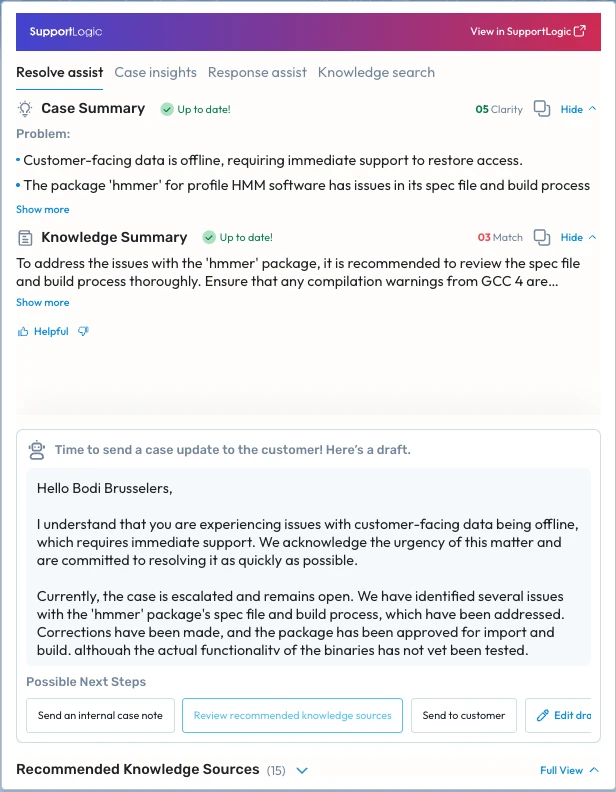
Auto Case Summarization ensures that every case entering SupportLogic already has clear, structured context — without requiring an agent to request or refresh a summary.
Unlike on-demand summaries, Auto Case Summarization runs continuously in the background.
What this means in practice
New cases are summarized automatically shortly after creation in the CRM
As cases evolve (new comments, updates, or field changes), summaries are incrementally refreshed
Optional backfill allows historical cases to be summarized as well
Once enabled, both active and legacy cases become immediately understandable and searchable across Resolve Assist experiences.
Summaries are visible wherever Resolve Assist is available:
SupportLogic Support Hub
Embedded CRM case views (iFrames / plugins)
2. Clarity-Aware Case Understanding
As part of Auto Case Summarization, each case is evaluated for how clearly the problem is described.
SupportLogic assigns a Clarity Score, which indicates whether:
The issue is well defined and ready for troubleshooting, or
Additional information is needed before meaningful investigation can begin
This clarity signal is used internally by Resolve Assist to:
Guide follow-up actions
Trigger appropriate response drafts
Determine when knowledge search and resolution guidance should be applied
3. Auto-Summaries Power Smarter Knowledge Discovery
When Auto Case Summarization is enabled, summaries are not just for reading they actively improve how knowledge is found and recommended.
Instead of relying on raw case text or keywords, Resolve Assist:
Uses the summarized problem statement as the basis for matching
Searches across cases, engineering tickets, and knowledge systems
Continuously improves relevance as new cases are resolved
This results in:
Fewer irrelevant recommendations
More actionable guidance aligned to the real issue
Better reuse of solutions discovered in past cases
The Knowledge Summary and recommended sources shown to agents are driven by this summarized understanding, not simple text matching.
Related Articles
Was this article helpful?
That’s Great!
Thank you for your feedback
Sorry! We couldn't be helpful
Thank you for your feedback
Feedback sent
We appreciate your effort and will try to fix the article