Overview
This document outlines the Alerting Framework designed for the Intelligent Case Assignment (ICA) module.
The purpose of this framework is to proactively notify customers when ICA encounters failures or operational issues, enabling faster awareness and resolution.
Background
Customers require timely notifications when ICA is not functioning as expected. Delays in identifying assignment issues can impact case routing efficiency and operational performance.
SupportLogic already captures ICA errors and failures through the Event Log API, which powers the internal alerting framework. The same event data will now support a customer-facing alerting framework.
Alert Reasons and Severity Levels
The Event Log API captures multiple ICA-related events. The following reasons are prioritized in the initial release:
1. CASE_SKIPPED_NO_AGENTS_AVAILABLE
Severity: Warning
Description:
No available agents were found for the case.
This considers:
Agent availability
Agent limits
Queue limits
2. CASE_SKIPPED_ALL_AGENTS_RECENTLY_ASSIGNED
Severity: Warning
Description:
All eligible agents for the case were already assigned to the same case within the past 8 hours.
This scenario is rare.
3. CASE_SKIPPED_CRM_SYNC_FAILURE
Severity: Critical
Description:
Indicates a failure in the CRM writeback framework, typically related to authentication issues.
Recommended action:
Verify that the integration user is properly connected in the Integration Settings page.
4. CASE_SKIPPED_CRM_SYNC_FAILURE_UPDATE_OWNER
Severity: Urgent
Description:
Indicates a writeback failure for a specific case when updating the owner.
This is usually tied to additional CRM-level validations.
The failure description returned by the CRM should be reviewed to identify the root cause.
5. CASE_SKIPPED_TOO_MANY_AGENTS
Severity: Warning
Description:
Configuration issue within the Assignment Queues page.
Occurs when:
Queue scope is too broad
A case matches multiple queues
More than 150 agents are identified
If more than 150 agents are found, ICA cannot evaluate all scores.
6. CASE_SKIPPED_ML_MODELS_FAILURE
Severity: Urgent
Description:
Indicates ICA was enabled before machine learning models were fully set up in the environment.
This is rare and requires SupportLogic intervention.
7. CASE_SKIPPED_UNHANDLED_EXCEPTION
Severity: Critical
Description:
Indicates an unexpected system error within ICA flow.
This requires immediate triage by SupportLogic.
Alert Aggregation Strategy
To prevent alert fatigue, alerts are aggregated based on severity and frequency:
| Severity | Trigger Condition |
|---|---|
| Critical | 3 occurrences of the same reason within 15 minutes |
| Urgent | 5 occurrences of the same reason within 30 minutes |
| Warning | 10 occurrences of the same reason within 1 hour |
Both the event thresholds and time windows are configurable and may be adjusted as needed.
Additionally:
Alerts are sent to an internal mailing list by default.
This ensures internal visibility and alignment with customer notifications.
How to enable the setting?
You can now enable this option from the Settings icon on the Assignment Queues page. Please refer to the attached screenshot for guidance.
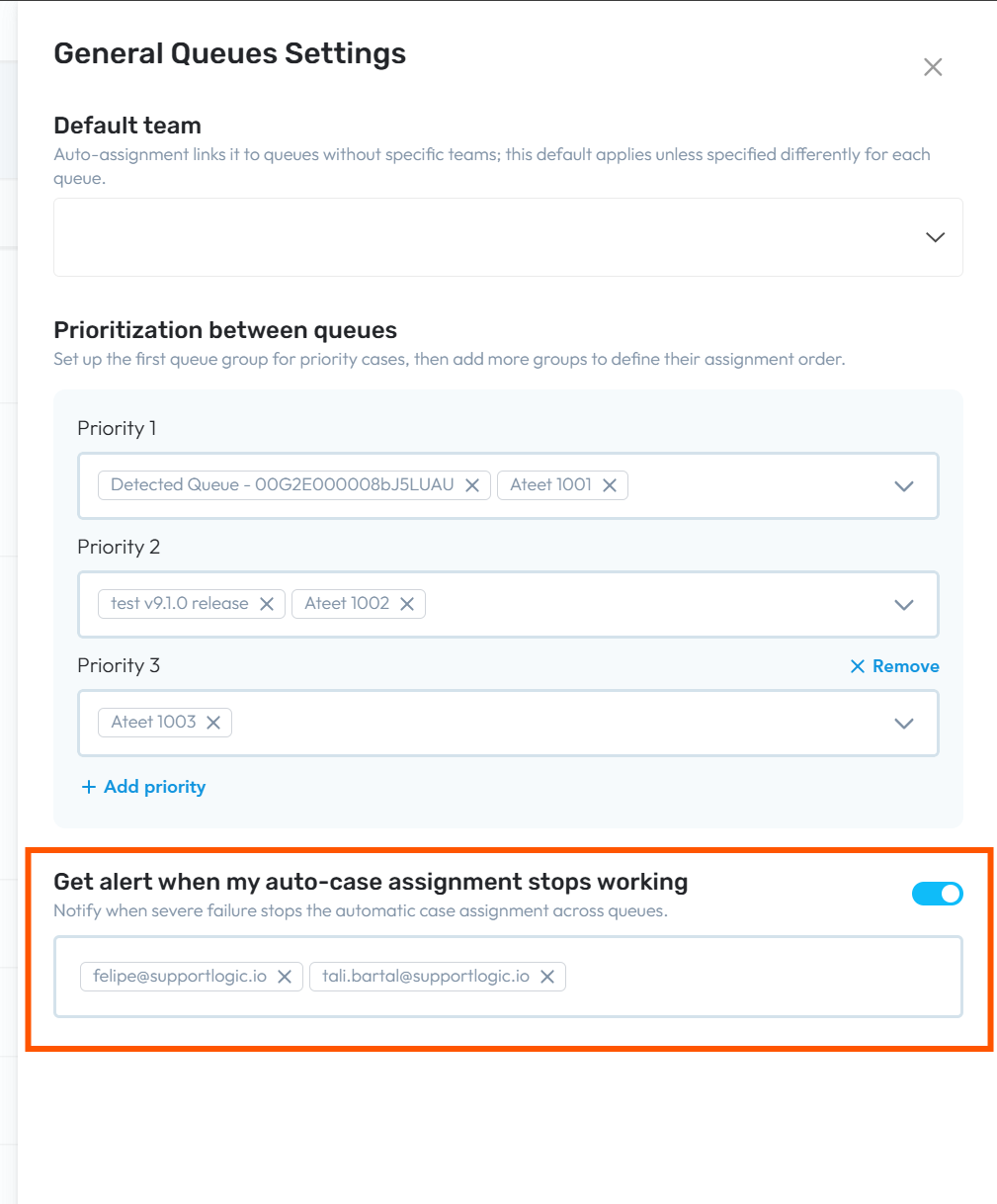
If further clarification is required regarding alert configuration or event behavior, please contact SupportLogic Support.
Was this article helpful?
That’s Great!
Thank you for your feedback
Sorry! We couldn't be helpful
Thank you for your feedback
Feedback sent
We appreciate your effort and will try to fix the article