In the SupportLogic UI, navigate to Modules → Operational Metrics to access performance insights.
For a detailed overview of Operational Metrics, please refer to the relevant KB article.
https://support.supportlogic.com/support/solutions/articles/73000618079-operational-metrics
Within the Operational Metrics page, you will find a tabular analytics report titled Escalation Review Activity. This report displays user-level activity metrics, including action counts and performance percentages.
The table includes columns such as:
Dashboard Predictions
Emails Sent
Slack Alerts Sent
Escalated
Acknowledged
Disagreed
Snoozed
% Actioned
% Activity Trend
Most columns display straightforward totals. However, % Actioned and % Activity Trend are calculated using specific formulas, as explained below.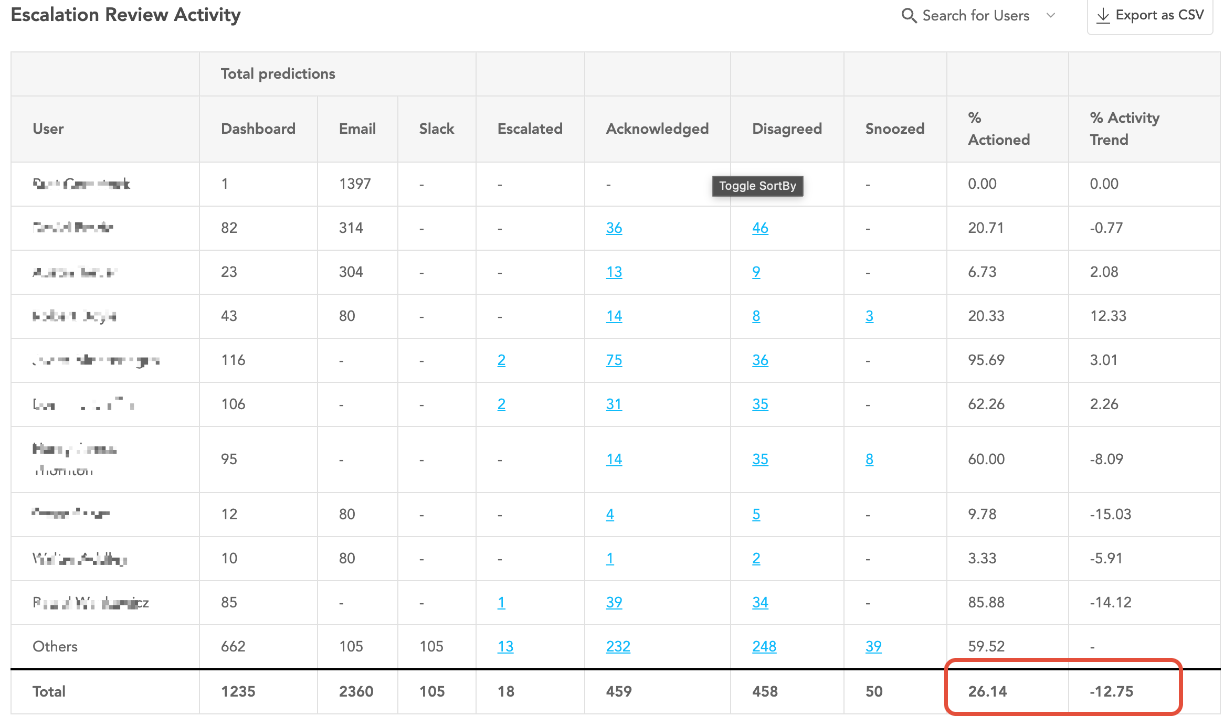
% Actioned – Calculation Logic
The % Actioned metric represents the percentage of prediction opportunities that were acted upon.
Formula:
(Number of acknowledged items + Number of disagreed items + Number of snoozed items) ÷ (Number of Dashboard predictions + Number of emails sent+ Number of Slack alerts sent) × 100Additional Rules:
The result is capped at 100% (it will never exceed 100%).
The value is rounded to 2 decimal places.
If there are no prediction opportunities, the system displays “-” instead of a percentage.
% Activity Trend – Calculation Logic
Step 1: Calculate Each User’s Previous %
For each user:
Previous % = Current % − Activity TrendThis gives the action rate for that user during the previous period.
Step 2: Calculate the Average Previous %
After calculating the previous % for each user:
Take the average of all users’ previous percentages.
In this example, the average previous % equals 39.16%.
Step 3: Calculate Overall Activity Trend
Activity Trend = Current Overall % − Average Previous %This value indicates whether overall engagement has increased or decreased compared to the previous period.
Was this article helpful?
That’s Great!
Thank you for your feedback
Sorry! We couldn't be helpful
Thank you for your feedback
Feedback sent
We appreciate your effort and will try to fix the article