We’ve been heads-down this month building the foundation for what’s next—starting with these core upgrades to your daily experience.
- Core SX
- Escalation board and Console cards updates
- Case and Account Cohort Summary - Possible Next Steps
- Unified SupportHub stabilization
- Full roll out of the AHS V2 and deprecation of the Customer Insights page
- Full roll out new Roles and Permissions
Resolve SX
- External vs. Internal KB draft Articles
Elevate SX
- Quality Agent
- Coaching Agent
Thanks
The SupportLogic Team
Core SX
Escalation board and Console cards updates
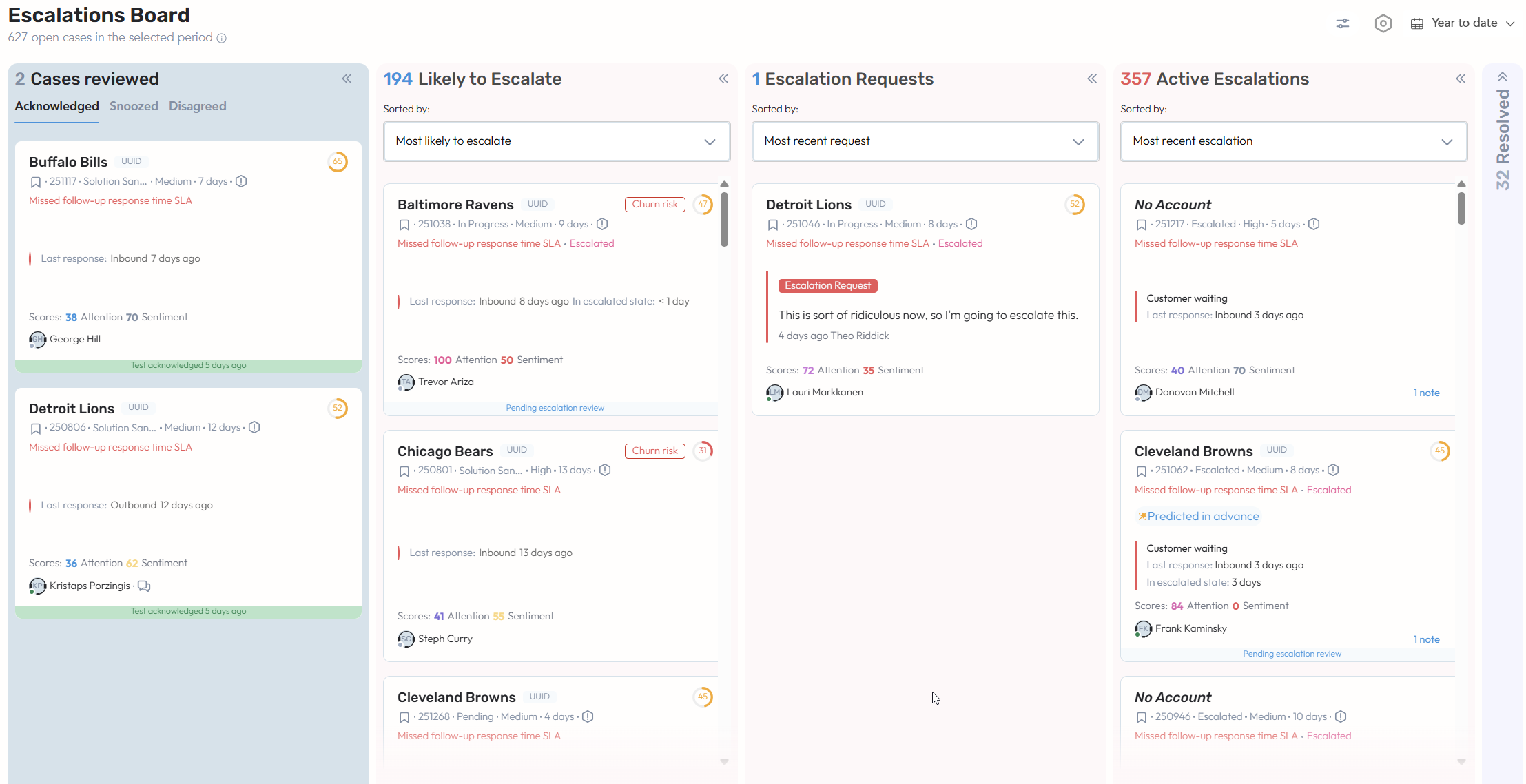
This update introduces significant enhancements to the Escalation Board layout and functionality, alongside improvements to the Console page to streamline case reviews and management.
Improved Escalation Board Cards - Escalation-related cards on the Escalation Board were refreshed to align with the design used across other application pages.
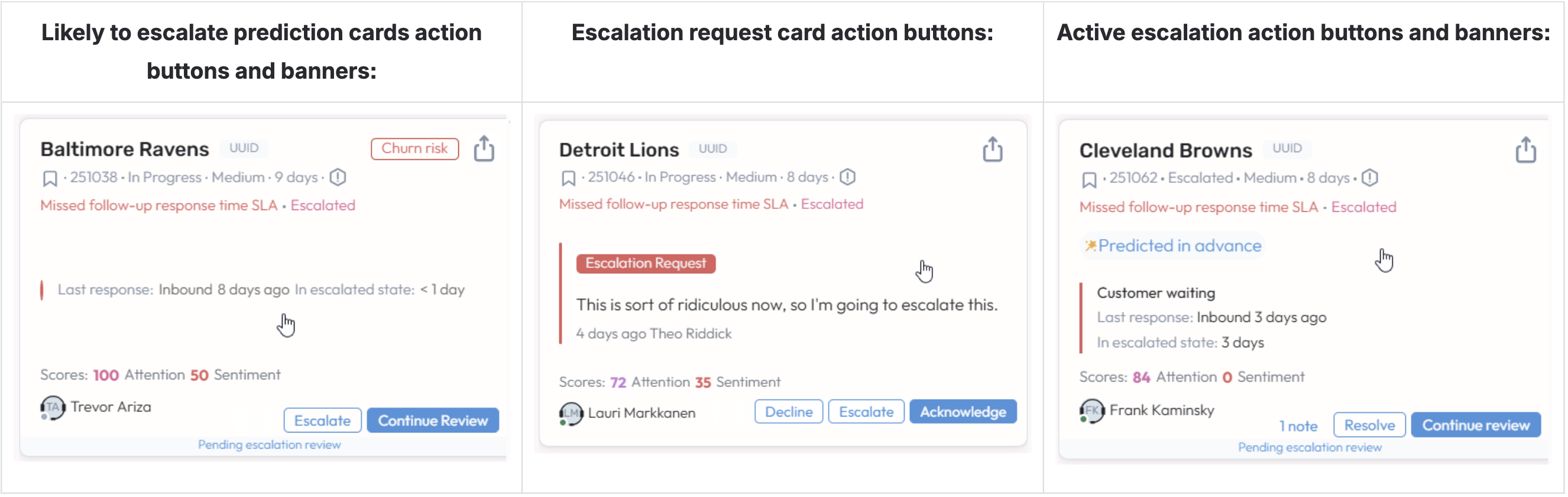
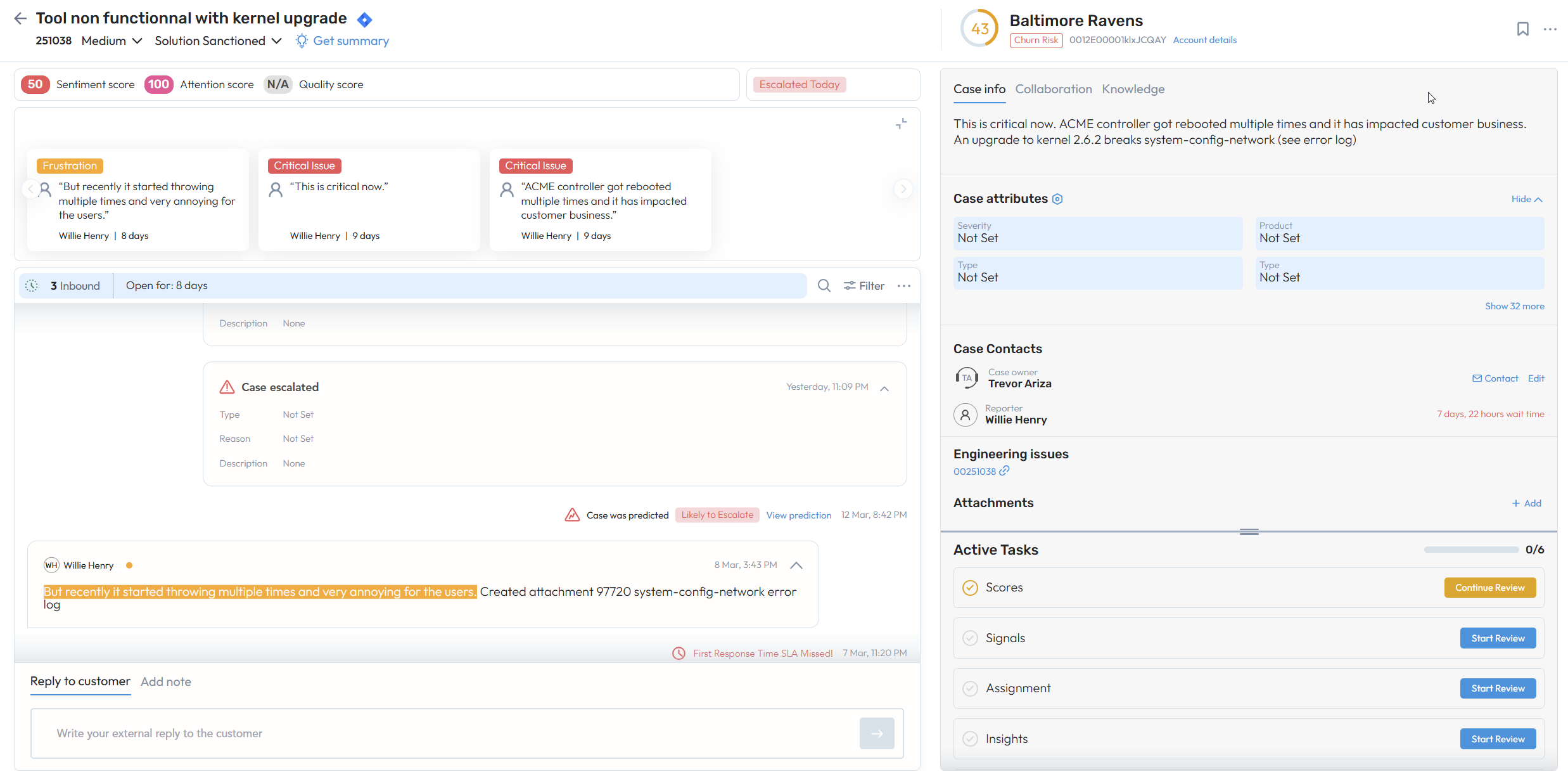
“Start/Continue Review” Action Buttons - LTE and Active Escalation cards now include a primary Start/Continue Review button that opens the review panel directly in SupportHub, helping users respond faster.
Status Banners & Prediction Context - LTE and Active Escalation review cards now show real-time status banners (for example, Pending escalation review or Reviewed by [User]). Active Escalation cards also indicate whether an escalation was predicted in advance or created outside the prediction window.
Improved Escalation Request Signal Handling - The Acknowledge and Decline buttons were moved to the bottom of the cards to make actions easier. When used, the cards automatically move to the Cases Reviewed column.
Manual Escalation & Slack Integration - Users with the right permissions can manually escalate cases from the LTE or Escalation Request columns using the new Escalate button. When escalating, users can optionally share the case with others or create a Slack channel for collaboration. Slack channel creation is now optional by default.
Improved Note Visibility for Active Escalations - The Add Note button is now always visible on Active Escalation cards, making it easier to add context quickly. Users can also edit or delete their own notes.
Resolve Active Escalations - Users with the appropriate permissions can resolve active escalations. When resolving, users must provide a reason in a required text field.
Updated Case Review Tabs - The Cases Reviewed column was updated with the improved cards organized into existing Acknowledged, Snoozed, and Disagreed tabs. An Undo button allows users to reverse actions if needed.
Console Page Improvements - To keep the experience consistent, Console cards for Active Escalations now include the Start/Continue Review button, prediction status information, and the always-visible Add Note button.
Case and Account Cohort Summary - Possible Next Steps
Case Age Review
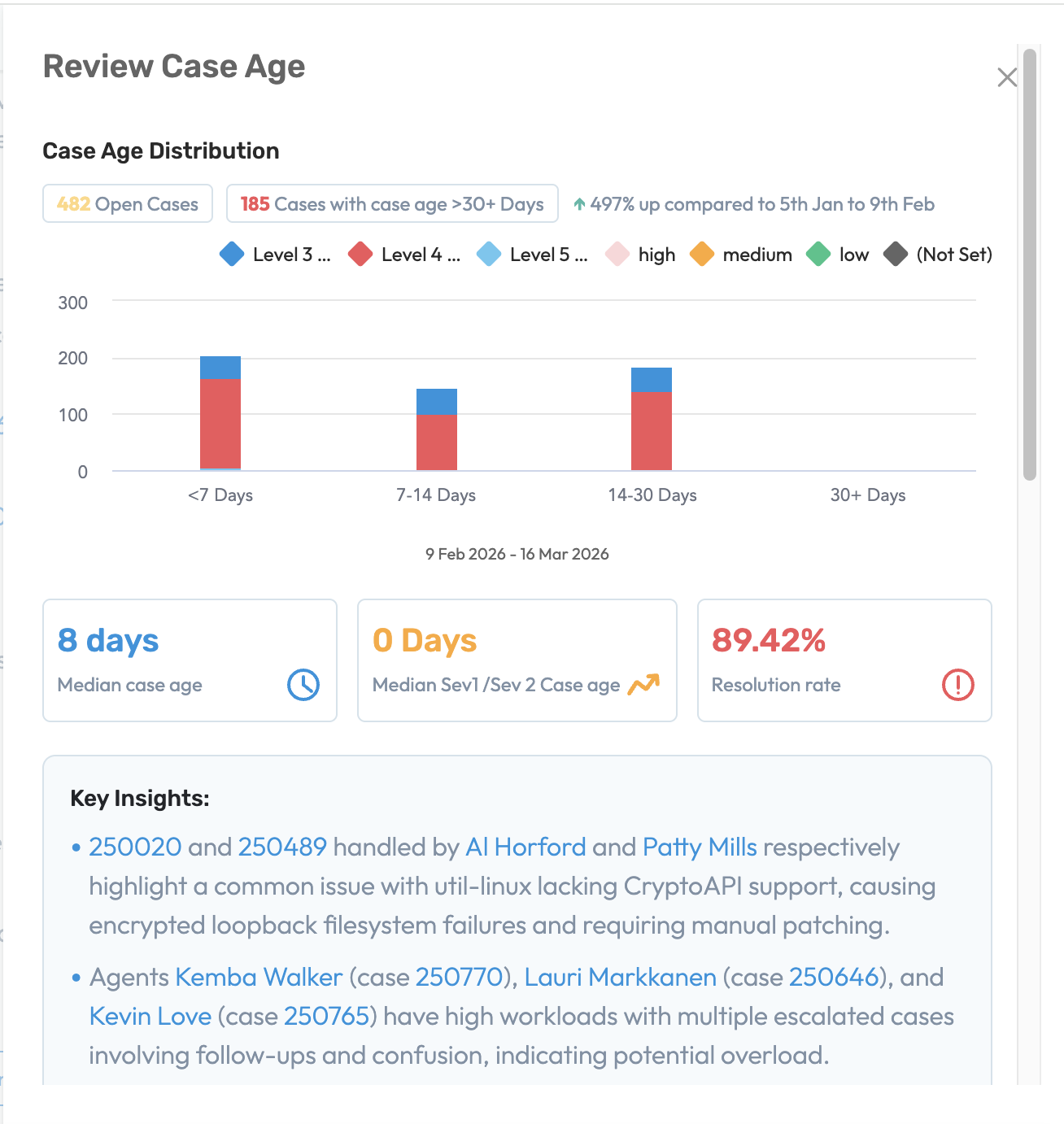
The Case Age Review feature helps support agents to quickly identify aging cases, understand the underlying reasons for delays, and take corrective action before customer experience is impacted. By combining ML-driven insights with operational metrics, the system highlights patterns across the case cohort to surface the most critical bottlenecks in resolution workflows.
Identify Aging Case Trends
Gain visibility into case age distribution across the support cohort to quickly identify cases approaching or exceeding defined age thresholds. The view displays case distribution across age buckets (<7 days, 7–14 days, 14–30 days, and 30+ days) enabling teams to quickly identify clusters of aging cases and potential SLA risksSurface Key ML insights for aging cases
The system automatically analyzes aging cases using AI/ML models to detect patterns and common signals, surfacing key insights such as recurring technical issues, workload bottlenecks, or unresolved escalations contributing to increased case ageIdentify engineering and product dependencies
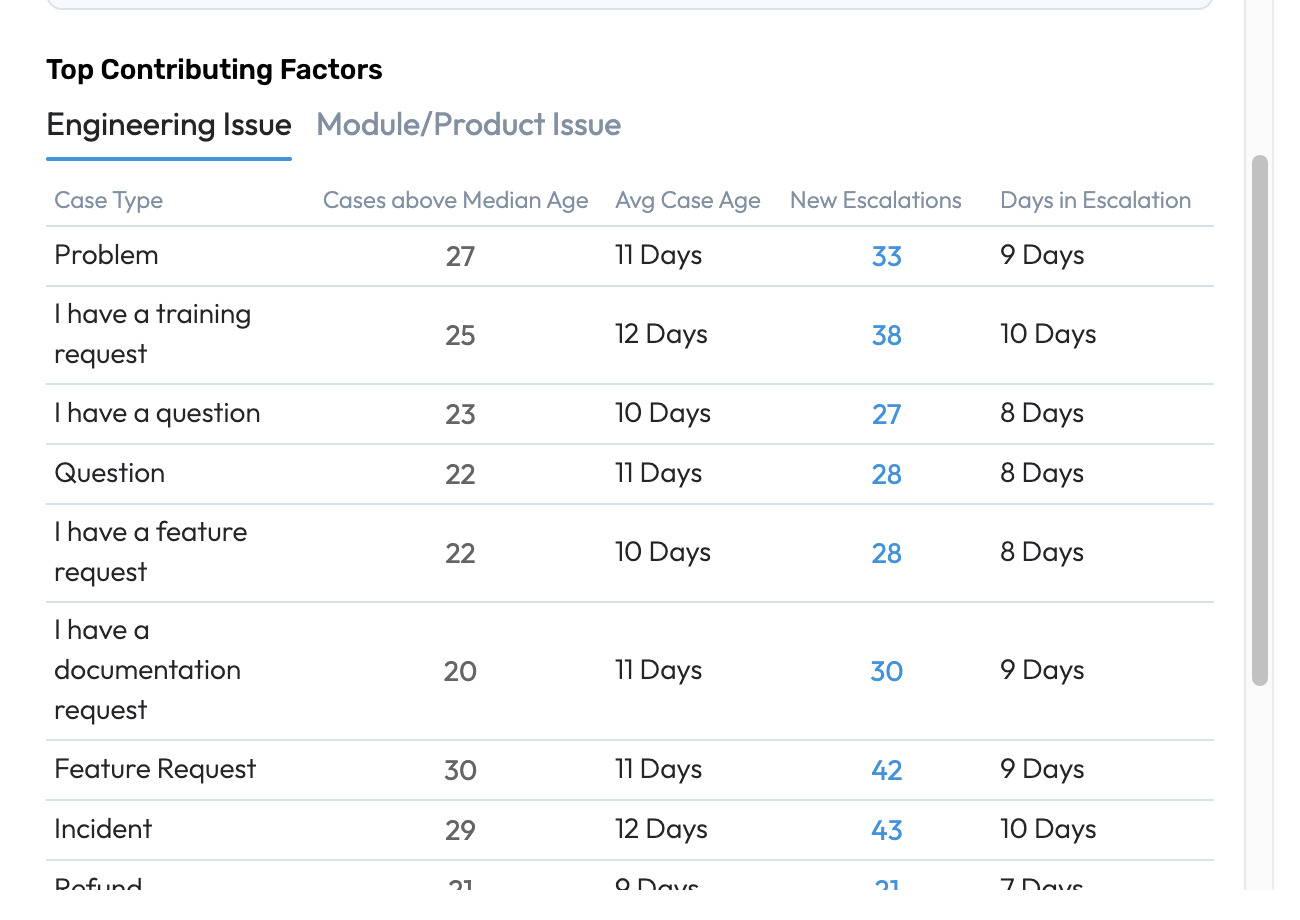
Identify the top engineering or product issues linked to cases exceeding the median case age. This helps teams quickly understand whether delays are caused by technical dependencies, product defects, or support workflow inefficiencies
Review SLA
Unified visibility into SLA breach patterns
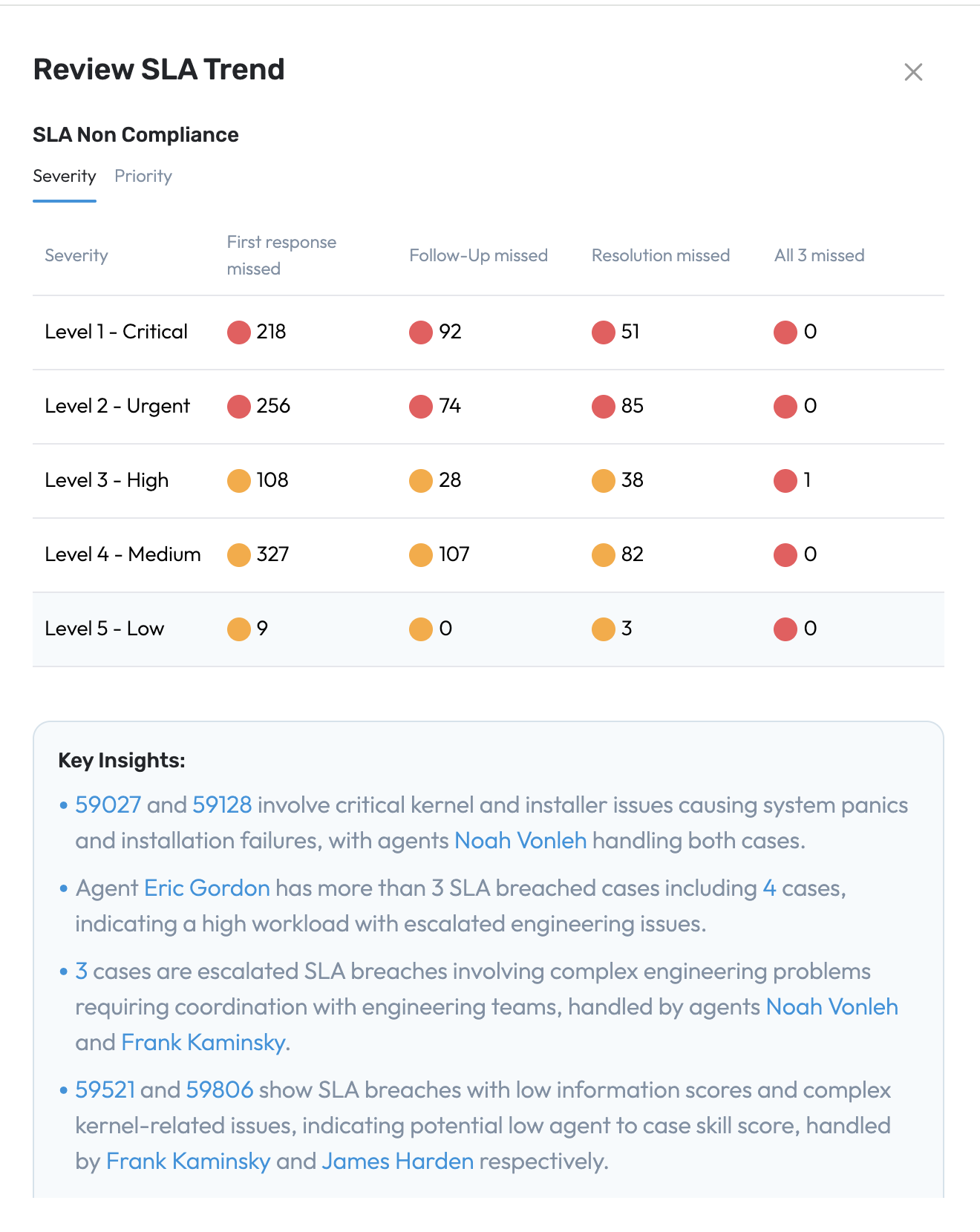
Review SLA Trend provides a consolidated view of SLA breaches across key service milestones, including:
First response time
Follow-up response time
Resolution time
These metrics are analyzed across severity levels and priorities, enables support manager to quickly identify where SLA compliance is impacted.
Account-level SLA risk detection
The platform identifies customers experiencing repeated SLA breaches and highlights accounts with the highest breach concentration. This enables support and customer success teams to prioritize proactive engagement and prevent potential escalation risks
Unified SupportHub stabilization
This update includes several UI improvements, bug fixes, and workflow updates to make SupportHub easier to use and more reliable.
Key Improvements
Cleaner Interface Design – Updated header styling and improved typography across the platform for better readability.
Timeline Interaction in Workflows - When the right panel is expanded, while interacting with signals or case highlights the Timeline area opacity is reduced to improve visibility and focus on the selected content.
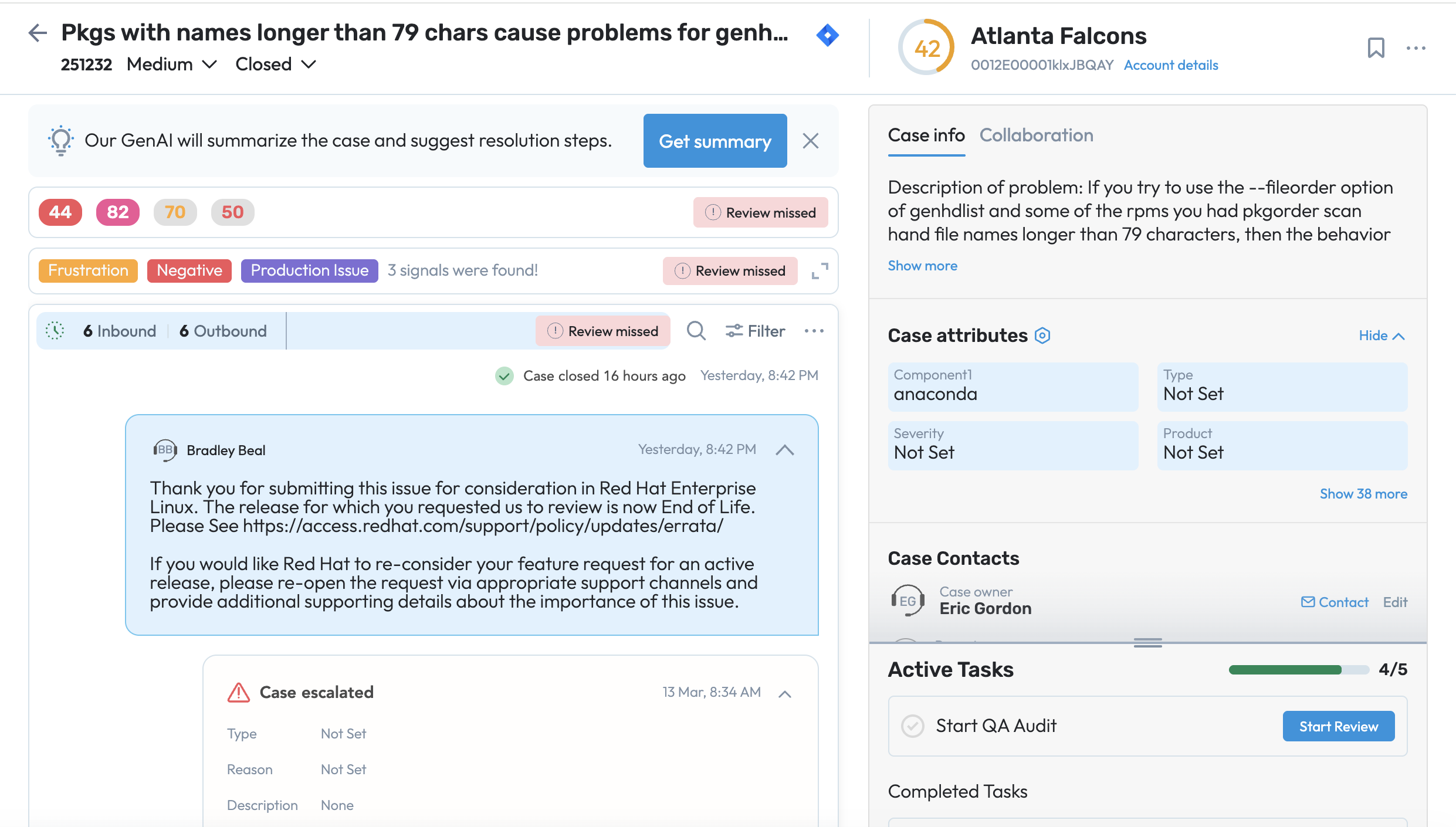
Review missed tags when the case is in Closed status and some reviews remain incomplete.
Improved Escalation & Review Actions – Action buttons and workflows are now more consistent across pages, helping users review and manage cases faster.
Bug Fixes
Improved Text Retention – Text written in reply or case note fields now remains when switching to the maximized view.
Better Email Formatting – Email comments now display with proper line spacing for easier reading.
Accurate Signal Navigation – Selecting a signal now correctly opens the chosen item in the Review panel.
Correct Text Selection for Sentiment Labels – Fixed an issue where selecting text could highlight extra characters.
Permissions & Access
Corrected Action Visibility – Users now only see escalation or review actions if they have the required permissions.
Improved “View as User” Mode – The banner indicating this mode now appears consistently across SupportHub pages.
Performance Improvements
Faster UI Response – Reduced interface lag and improved responsiveness when performing actions like acknowledging signals.
Note -
With this release, we are enabling the Unified SupportHub page for all users. The new page can be accessed from the top-right menu within SupportHub.
Users can still switch back to the legacy SupportHub page from the same menu.
As users move between the two versions, feedback will be collected to help us continue improving the experience.
To access the Improved SupportHub page select from the page menu “Switch to new SupportHub”
To switch back to the Legacy SupportHub page select from the page menu “Switch to old SupportHub”
AHS V2 Rollout and Deprecation of Customer Insights page
With the 9.6V release, we are rolling out AHS V2 to all customers and retiring the legacy Customer Insights page.
The upgraded Account Hub page replaces Customer Insights page and provides full AHS V2 functionality across all areas, delivering improved insights, streamlined workflows, and a consistent experience for every user.
Roles & Permissions V2 Rollout
With the 9.6V release, we are deprecating the legacy Profiles model and migrating all customers to the new Roles & Permissions system to simplify access management and reduce maintenance.
Migration Details:
Existing users will be automatically mapped to new Roles with equivalent permissions.
New Roles will initially inherit permissions from all assigned users, which may result in broader access by default.
Recommended Customer Actions:
Review current Profiles before migration and reorganize users if needed.
After migration, review Roles to refine permissions or move users to dedicated Roles.
Monitor Role permissions when onboarding new users to ensure appropriate access.
Resolve SX
External vs. Internal KB draft Articles
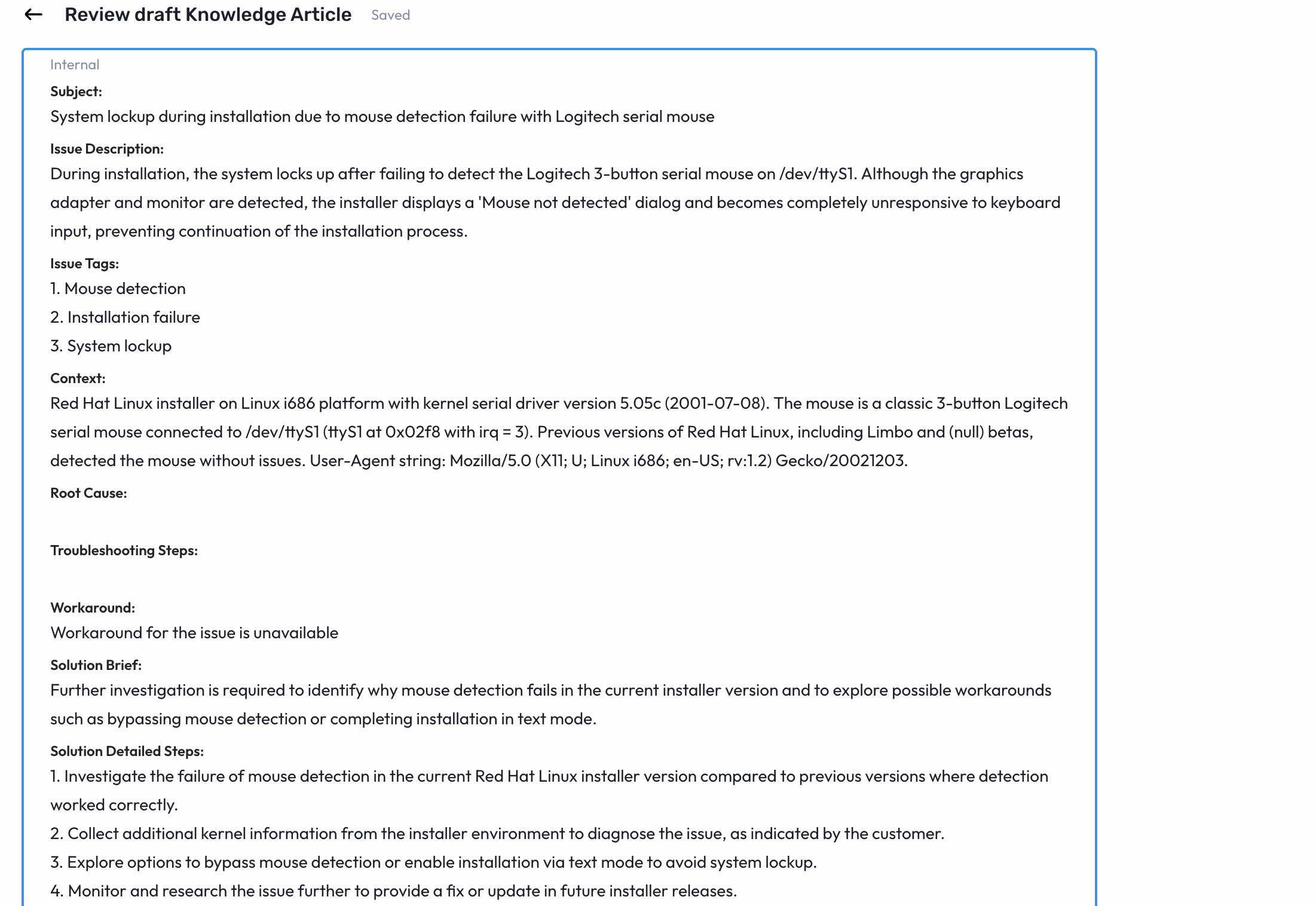
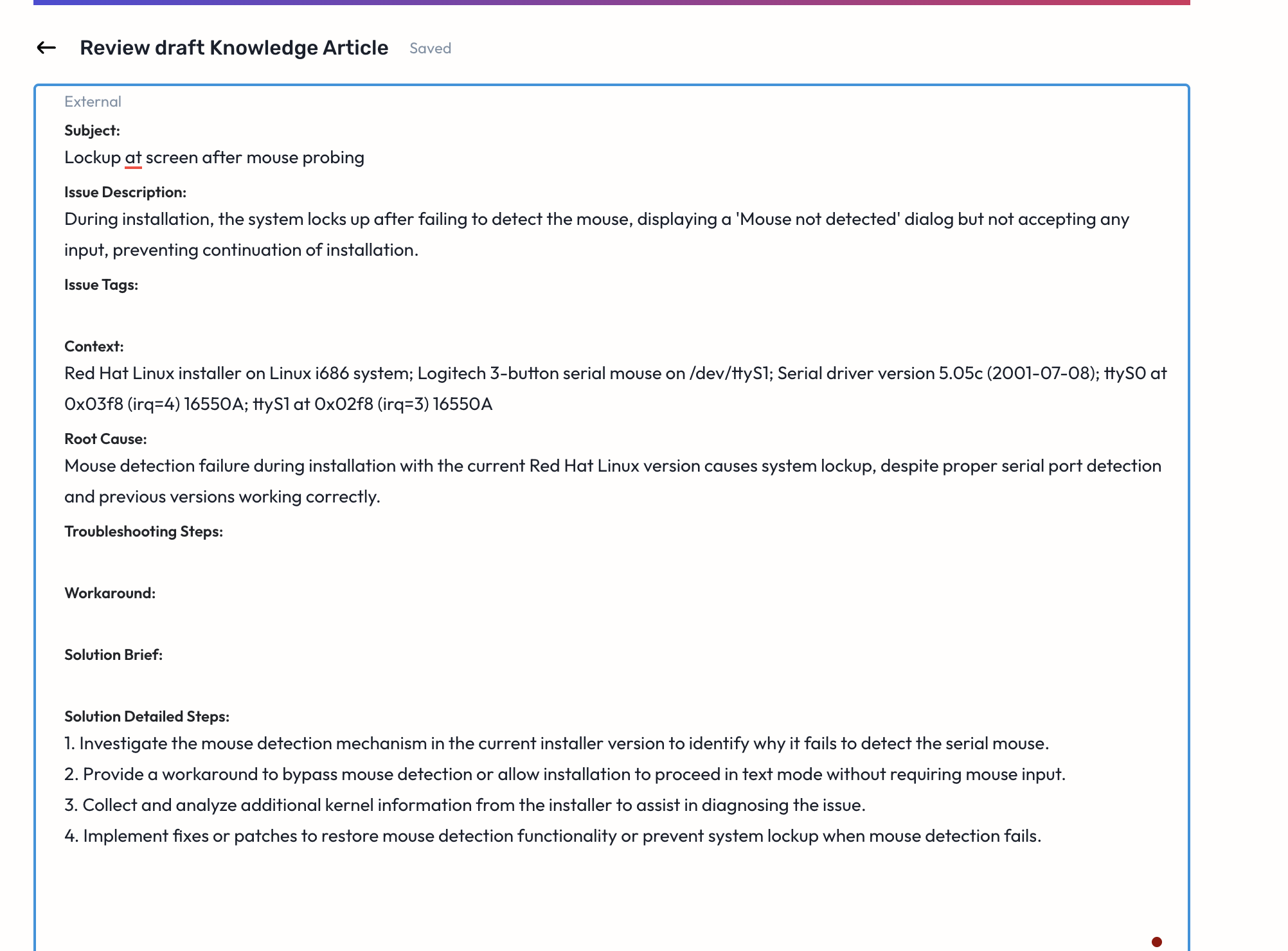
The new update introduces a major enhancement: Dual Knowledge Base (KB) Draft Generation. Users can now seamlessly generate both Internal and External KB articles directly within the resolution workflow, thereby bridging the gap between case resolution and knowledge capture.
Key Highlights
Dual KB Draft Generation
As soon as a case reaches the Solution Proposed or Closed state, the system automatically allows the user to generate an internal KB draft. From the same workflow, users can instantly generate a customer facing external KB article ensuring both internal knowledge capture and customer communication happen in one seamless flow
Workflow integration with control
Users can edit, review, and publish internal and external drafts independently, with the ability to regenerate content as needed using Apply / Deny controls. Both articles are published as distinct, clearly labeled knowledge assets, making it easy to manage and reuse knowledge across teams
Internal vs External KB – Key Differences
Section | External KB (Support Facing) | Internal KB (Customer-Facing) |
|---|---|---|
Language | Simple, non-technical | Technical, diagnostic |
Use Case | Customer self-service | Troubleshooting & escalation |
Root Cause | High-level | Deep technical insights |
Resolution Steps | Customer-safe steps | Includes internal workflows |
Elevate SX
Quality Agent
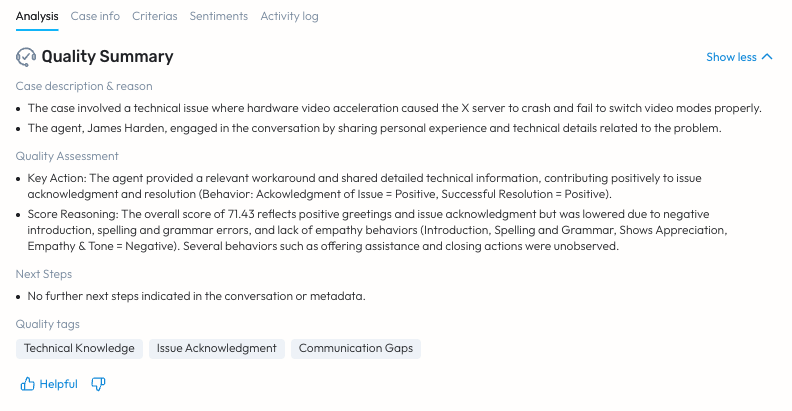
The much awaited agentic flows within Elevate are here. The Quality Agent has two main features as of now - the Quality Summary and the Proposed Actions. The Quality summary is a case level, AI-generated summary that provides a brief of the quality of the support provided to the customer by the agent(s) working on the case. The aim here is to provide an unbiased view into the facts of the case, and to boil the case down to a few pointers for simpler and quicker understanding.
Moreover, there are now “Quality Tags” that are generated and associated with the case - that can soon be used within other workflows in Elevate like - Assignments, Filters, Reports etc.
Proposed Actions are a guided look at all of the actions that should be taken for the case. Currently, they bring together all of the existing actions for the case, to once place.
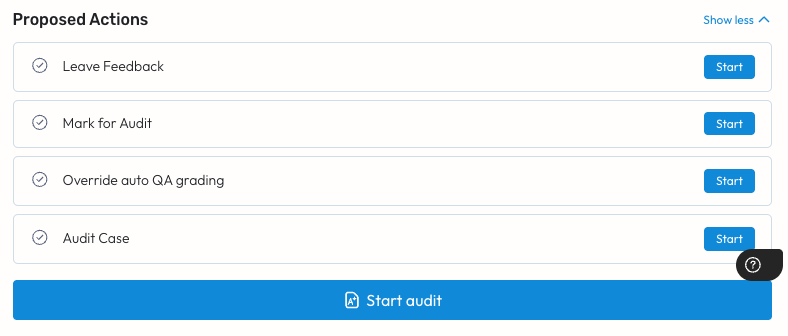
Stay tuned for more actions to be added to this list, with whole new workflows - such as adding the case to a Watchlist or one-click RCA document generation.
Coaching Agent
The Coaching Agent is a case-level, AI-generated summary that translates the quality of the support provided into a developmental and improvement guidance summary for the agent(s) working on the case. Apart from the Summary itself, the Coaching Agent also outputs Coaching Tags like the Quality agent and it adds to Actions within the Proposed Actions section, as shown above.
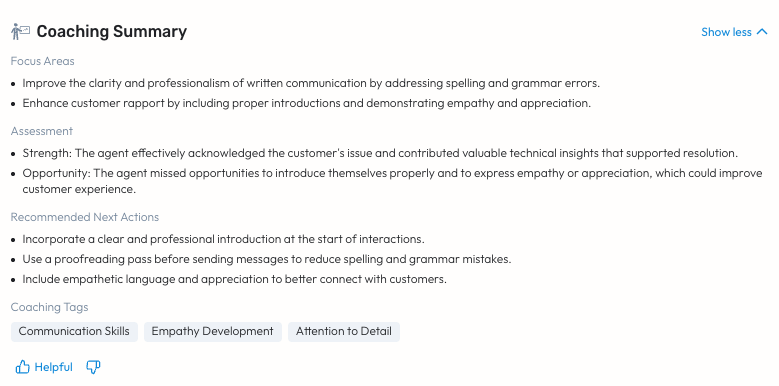
Some key Actions that are coming soon like one-click casestudy creation for a case.
The Quality Agent and Coaching Agent work together and hence are bundled together. They are both currently in Beta and will be automatically rolled out to our existing Beta customers.
If you’d like to trial this and get onto the Beta list, please reach out to us.
Was this article helpful?
That’s Great!
Thank you for your feedback
Sorry! We couldn't be helpful
Thank you for your feedback
Feedback sent
We appreciate your effort and will try to fix the article