Question:
When creating keyword alerts, only a limited list of keywords appears for selection. Is it possible to configure alerts using any keyword or entity, including those not listed in the suggestions?
Answer:
Yes, keyword alerts can be configured for any keyword, even if it does not appear in the suggested list.
The keywords shown in the dropdown are not predefined or restricted. They represent recently used keywords within the system to provide quick suggestions.
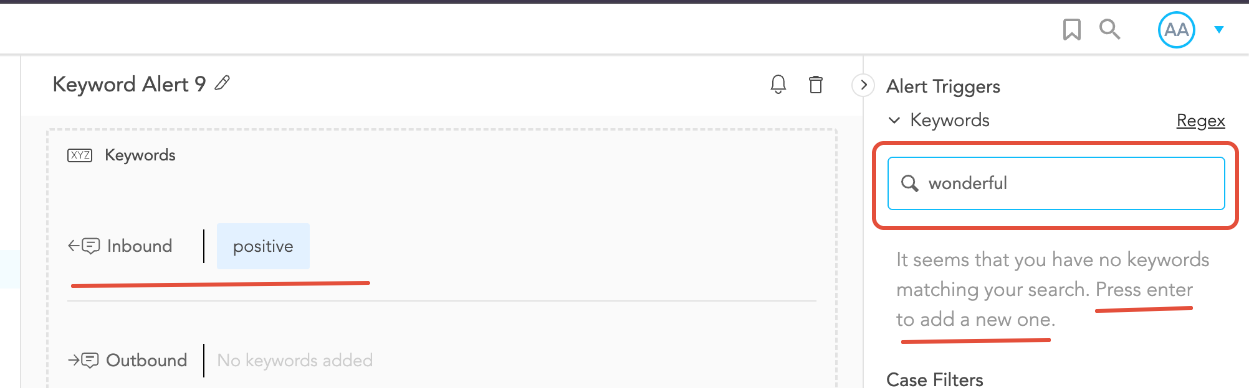
If a desired keyword is not listed:
Simply type the keyword into the field
Press Enter to add it
For example, entering “positive” and pressing Enter will add it as a new keyword for the alert.
Key Points
- The suggested list is based on recent usage, not a fixed set of keywords
- Any custom keyword can be added manually
- Keywords do not need to exist as predefined entities
- Alerts will trigger whenever the specified keyword appears in case conversations.
If additional help is needed with configuring keyword alerts, please contact SupportLogic Support.
Was this article helpful?
That’s Great!
Thank you for your feedback
Sorry! We couldn't be helpful
Thank you for your feedback
Feedback sent
We appreciate your effort and will try to fix the article