Overview
Managing agent schedules across multiple platforms can lead to administrative overhead and data mismatches. To streamline your workflow, SupportLogic now allows you to pull agent availability directly from a custom field within your CRM.
By leveraging your CRM as the single source of truth, you can automate case assignment logic and update agent tooltips without ever needing to manually maintain Shifts or Out-of-Office (OOO) calendars inside the SupportLogic UI.
Key Benefits
Faster Onboarding: Accelerate your deployment of the SupportLogic Assign module by connecting to data you’ve already configured.
Zero Redundant Maintenance: Eliminate the need for support managers to duplicate schedules, shifts, or OOO updates across two different systems.
How It Works
SupportLogic references a specific boolean (True/False) custom field on the User object in your CRM to determine whether an agent is ready to receive cases.
True= Agent is not available for assignment.False= Agent is available for assignment.
This field is mapped to the SupportLogic schema via our Unified Workflow Framework (UWF) and consumed securely through the SupportLogic API. Once ingestion is complete, the Intelligent Case Assignment (ICA) engine routes cases as usual, factoring in your standard capacity limits and skills-matching rules
CRM-Agnostic Engine: This feature is built to support all major CRM platforms, ensuring a consistent experience regardless of your tech stack.
| Priority | Source | Description |
| Primary | CRM Custom Field | The system default. If present, it overrides all other scheduling data. |
| Secondary | SupportLogic Shifts | Used automatically if the CRM flag is missing or unconfigured. |
| Tertiary | Predicted Hours | Fallback if neither CRM data nor Shifts exist. Availability is calculated based on the agent's actual case activity over the last 30 days. |
Agent Tooltips Update
Your team will see updated tooltips across the platform to reflect this new data source. When an agent's status is driven by your CRM, hovering over their name will display:
Active / Inactive Status: Directly mirroring the current CRM boolean flag.
Predicted Hours: Showing historical activity from the last 30 days to give managers additional context on capacity.
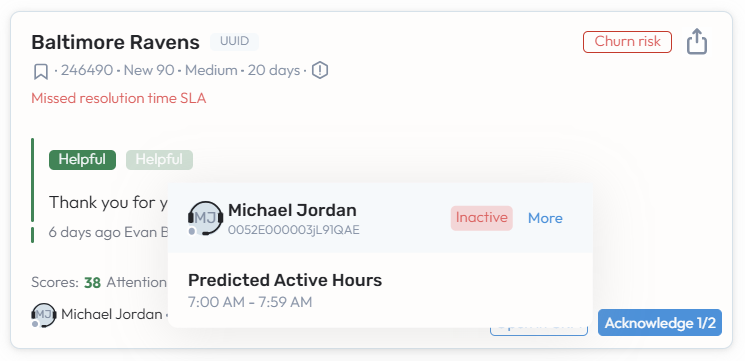
Note: Updated agent tooltips are available to all customers and do not require a full Intelligent Case Assignment (ICA) implementation to function.
Configuration Best Practices
Depending on how your organisation manages support tiers, choose the scenario below that best fits your operational model:
Scenario A: You want to use CRM Availability exclusively
If your entire team is transitioning to CRM-driven availability:
- Clear Legacy Data: Delete all existing shifts within SupportLogic.
- Clean UI: Disable the Shifts page in your environment settings.
- Reduce Noise: Hide the Out-of-Office (OOO) calendar on the Agent Insights page to prevent agent confusion.
Scenario B: You run a hybrid model (Some teams use CRM, others use Shifts)
If one group uses the CRM custom field and another relies on SupportLogic Shifts:
- Isolate the Groups: Ensure that the CRM custom field is left blank/null for the agents who are supposed to use SupportLogic Shifts.
- As long as the CRM field is unpopulated for the second group, the system will seamlessly fall back to Priority 2 (Shifts) for those specific agents.
Next Steps & Setup
Ready to connect your CRM availability field? Please reach out to your SupportLogic support or our technical support team to configure your UWF mapping and validate your CRM readiness.
Was this article helpful?
That’s Great!
Thank you for your feedback
Sorry! We couldn't be helpful
Thank you for your feedback
Feedback sent
We appreciate your effort and will try to fix the article