We're excited to share what's new in SupportLogic this month. Highlights include a hyper-personalized draft response tool on our MCP server, one-click case cohort summaries, and actionable escalation predictions right inside your CRM.
In This Release
- Core SX
- MCP Server: Hyper-Personalized Draft First Response Tool
- Case Cohort Summaries Across Case Lists
- Actionable Case iFrames
- Case and Account Summaries in Alert Notifications
- Improved Case Auto-Assignment Classification
- Inactive User Exclusion in Case Assignment Recommendations (Salesforce and Zendesk CRMs)
- Expanded Alerts for Unassigned Case Failures
- Configurable Case Count Display in Dynamic Filters
- Case-Driven Case Attachment Ingestion
- Escalation Prediction Model Accuracy & Reliability Improvements
- Elevate SX
New Features and Updates
Core SX
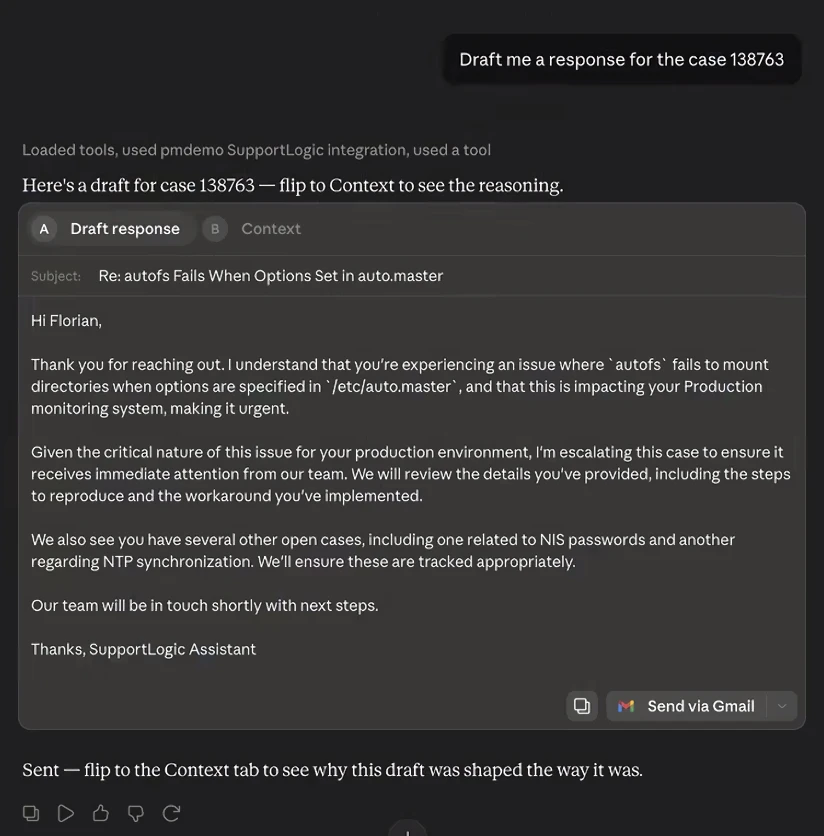
▎ MCP Server: Hyper-Personalized Draft First Response Tool
Agents can now generate a draft first response to a customer directly through the MCP interface, ready to review and send.
- The tool builds the draft by pulling in full case context, grounding the response in the specifics of the customer's issue rather than a generic template.
- It also factors in account-level data and, for customers with Resolve SX integrated, relevant historical cases — so the draft reflects the broader relationship, not just the ticket at hand.
- The result is a highly personalized reply the agent can copy and paste, cutting response drafting time while keeping the tone and content tailored to that specific customer.
▎ Case Cohort Summaries Across Case Lists
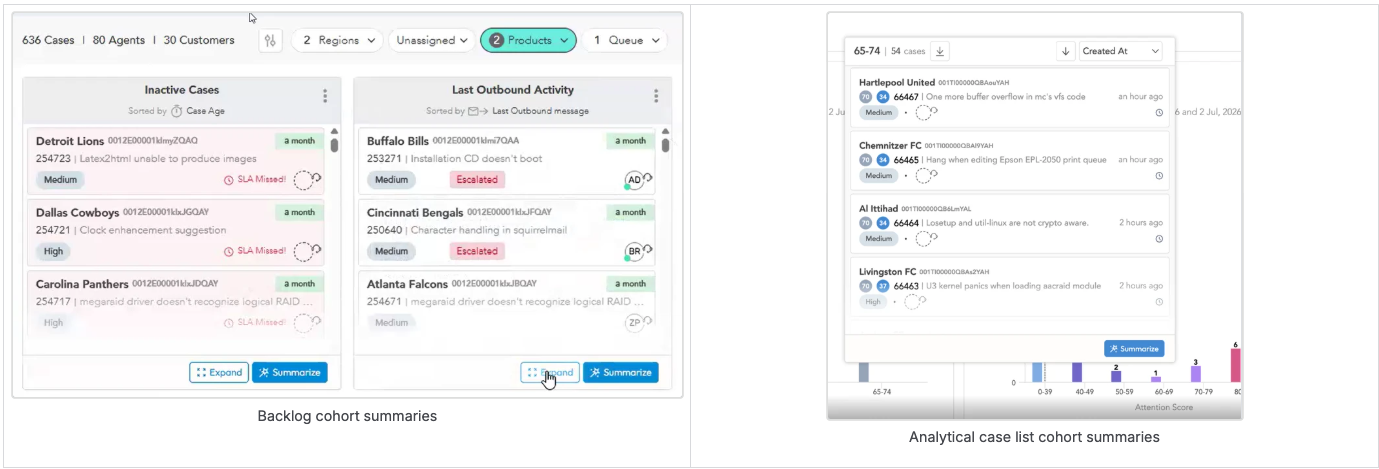
Any list of related cases across the application can now generate a single cohort summary with one click.
- Wherever a hover list or column shows a group of related cases, a new action lets you generate a summarized view across that group.
- This gives agents and managers a fast read on a cluster of cases without opening each one individually.
- The summary is scoped to the most recent cases in the list by default, keeping the output focused and fast to generate.
▎ Actionable Case iFrames
Escalation Predictions Interaction in the Case iFrame
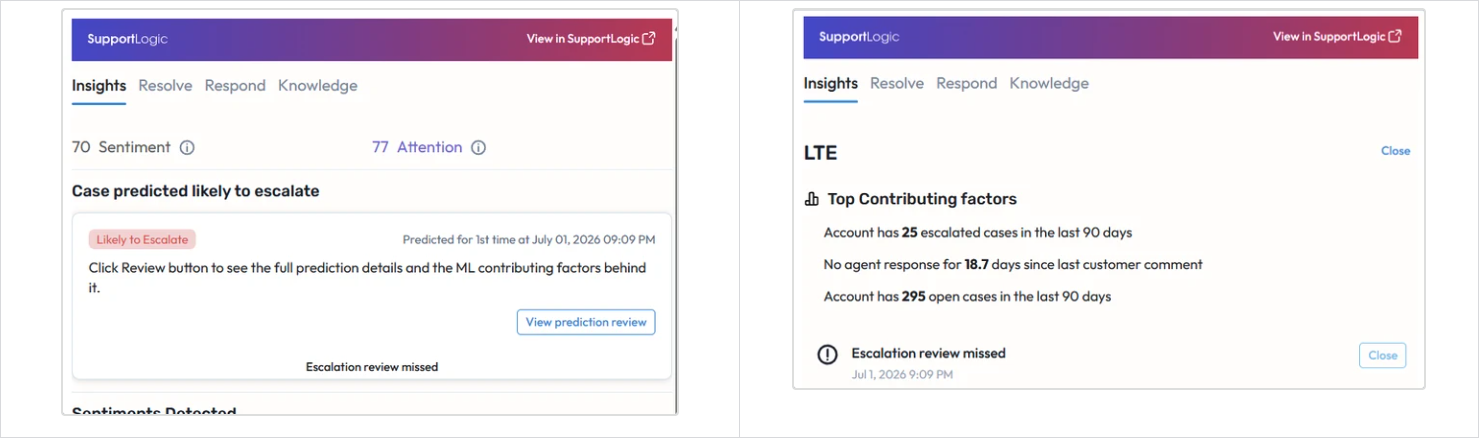
Escalation prediction data is now actionable directly within the case iFrame, allowing agents and managers to interact with escalation risk signals in their CRM context.
- Top contributing factors for escalation are surfaced in the iFrame alongside case details, giving agents visibility into predicted escalation likelihood without opening SupportLogic separately.
- Agents can acknowledge an escalation prediction, disagree, or snooze it — directly from the iFrame.
- This brings escalation model outputs into the CRM workflow, enabling proactive intervention where cases are actively worked rather than after the fact in the SupportLogic console.
Configurable Tab Order in the Case Widget
The order of tabs in the case widget can now be configured per account, rather than following one fixed default.
- Admins can choose whether Case Insights, Resolve, or Knowledge appears as the first tab in the embedded case widget.
- This lets teams surface the information their agents rely on most as the very first thing they see when opening a case.
- The change replaces an older, more limited toggle with a cleaner mechanism for controlling tab order going forward.
▎ Case and Account Summaries in Alert Notifications
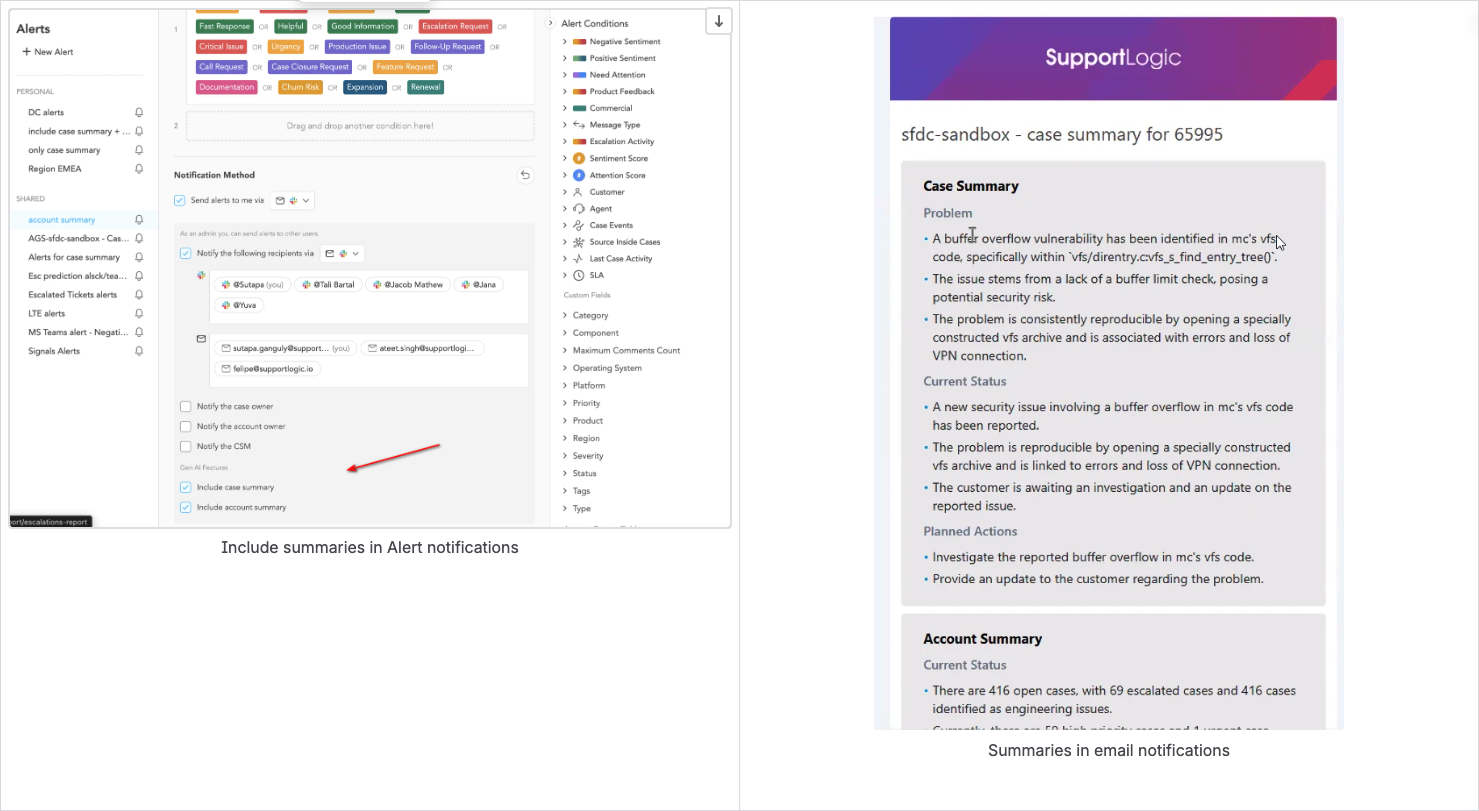
Alert notifications can now include an AI-generated case and account summary directly in the message.
- Admins configuring an alert can opt in to including a case summary, an account summary, or both, right in the notification body.
- Recipients get the context they need to act immediately from Slack or email, without switching over to SupportLogic first.
- The option is available for both email and Slack alert channels, so teams can standardize on whichever channel they already use.
▎ Improved Case Auto-Assignment Classification
Automated case assignment now correctly distinguishes between group-level and agent-level targets when routing work.
- Assignment logic classifies whether a case should route to a queue or a specific agent, reducing misrouted cases during manual queue assignment.
- Support operations teams see fewer cases landing in the wrong place and needing manual correction.
- The fix specifically addresses assignment behavior in manual queue-routing scenarios that previously caused ambiguity.
▎Inactive User Exclusion in Case Assignment Recommendations (Salesforce and Zendesk CRMs)
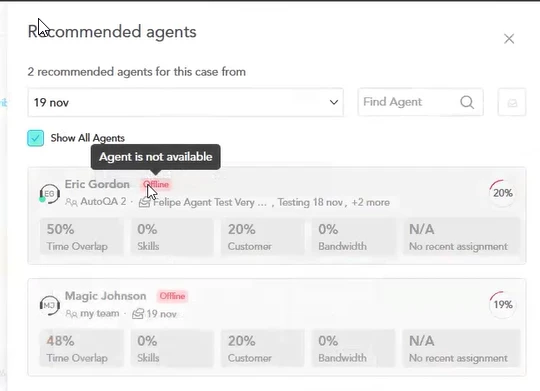
Case assignment recommendations now automatically exclude agents who are no longer active.
- The recommendation engine filters out inactive users, so cases are never suggested for assignment to someone who has left or is disabled.
- Recommendation option lists and the recommendation drawer now show an inactive flag, so admins can see when a past assignee is no longer active.
- This closes a gap where stale user records could surface in day-to-day assignment workflows and cause confusion.
▎ Expanded Alerts for Unassigned Case Failures
Alerts for case assignment failures now cover additional scenarios and only surface cases that remain genuinely unassigned.
- Alert logic has been tightened so notifications only fire for cases that are still unassigned, cutting down on noisy or stale alerts.
- Failure emails now include which agent was originally picked for the assignment, helping admins spot patterns tied to a specific queue or rule.
- These changes extend the original assignment-failure alert to cover scenarios that weren't previously captured.
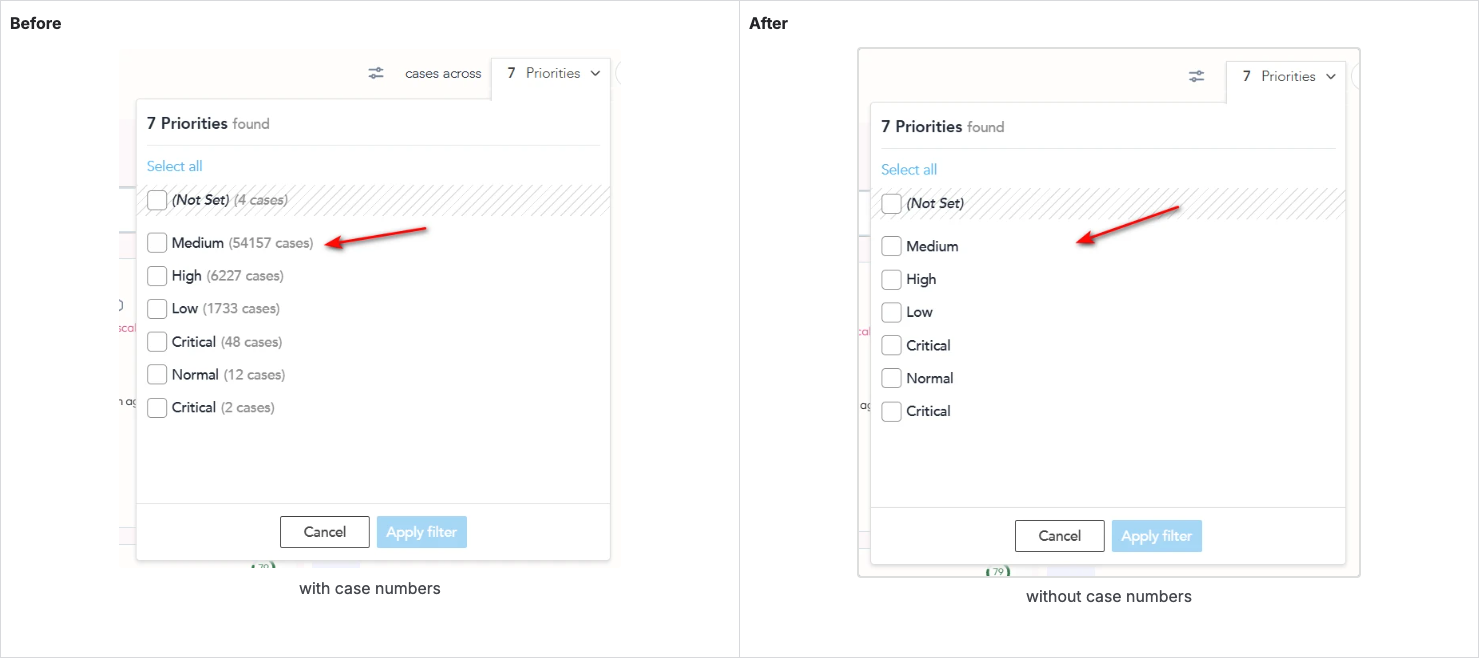
▎ Configurable Case Count Display in Dynamic Filters
Added the option to hide case counts inside Dynamic filters, giving admins control over count visibility and avoiding confusion when counts don't match filtered results.
▎ Case-Driven Case Attachment Ingestion
We've changed how SupportLogic fetches attachments from Salesforce to make the process more accurate and efficient.
Previously: We fetched attachments by querying Salesforce's ContentVersion table (which holds all file versions) first, then cross-checked them against cases afterward — pulling a broad set of file records and filtering down to only the ones actually linked to support cases.
Now: We flip the order. We start by querying the ContentDocumentLink table — which directly tells us which files are linked to which cases — and only then fetch the file details for those specific attachments.
This change brings a few concrete benefits:
- More accurate ingestion — only files confirmed to be linked to support cases are fetched, with no accidental over-fetching.
- Better performance — we avoid downloading attachment metadata we don't need.
- Improved reliability — the new approach handles large volumes of attachments in batches, making it more resilient for high-volume customers.
- No Salesforce permission changes needed — the new approach works without requiring elevated
QueryAllFilespermissions.
The attachments visible in SupportLogic remain the same — they just arrive more reliably.
▎ Escalation Prediction Model Accuracy & Reliability Improvements
Escalation prediction has been significantly enhanced to deliver more accurate, trustworthy risk signals across your support operations.
- Prediction accuracy improved meaningfully, with fewer false escalation alerts and stronger detection of cases that genuinely need attention — helping teams focus effort where it matters most.
- Underlying signal detection was strengthened and hardened for greater consistency, ensuring escalation risk scores reflect the most relevant case activity and customer sentiment.
- A production stability issue affecting escalation predictions was identified and resolved, and model retraining processes were optimized to keep predictions current and reliable going forward.
Elevate SX
▎ Advanced Search Performance Optimization
Advanced Search now returns results noticeably faster, especially on large case sets with multiple filters applied.
- Query execution has been optimized so complex, multi-filter searches no longer slow down as case volume grows.
- Agents and managers get near-instant results when narrowing case lists by several criteria at once, keeping investigative work moving.
- Performance was validated both before and after rollout, with a benchmark in place to catch regressions in future patch releases.
Was this article helpful?
That’s Great!
Thank you for your feedback
Sorry! We couldn't be helpful
Thank you for your feedback
Feedback sent
We appreciate your effort and will try to fix the article