This month's highlights include expanded MCP tool coverage for cohort insights and quality intelligence, new score- and metric-based alert conditions, and an early escalation warning signal that flags risk before a case formally escalates.
In This Release
New Features and Updates
Core SX
▎ Expanded MCP Tool Coverage: Cohort Insights, Deeper Escalation Context, and Elevate SX Quality Data BETA
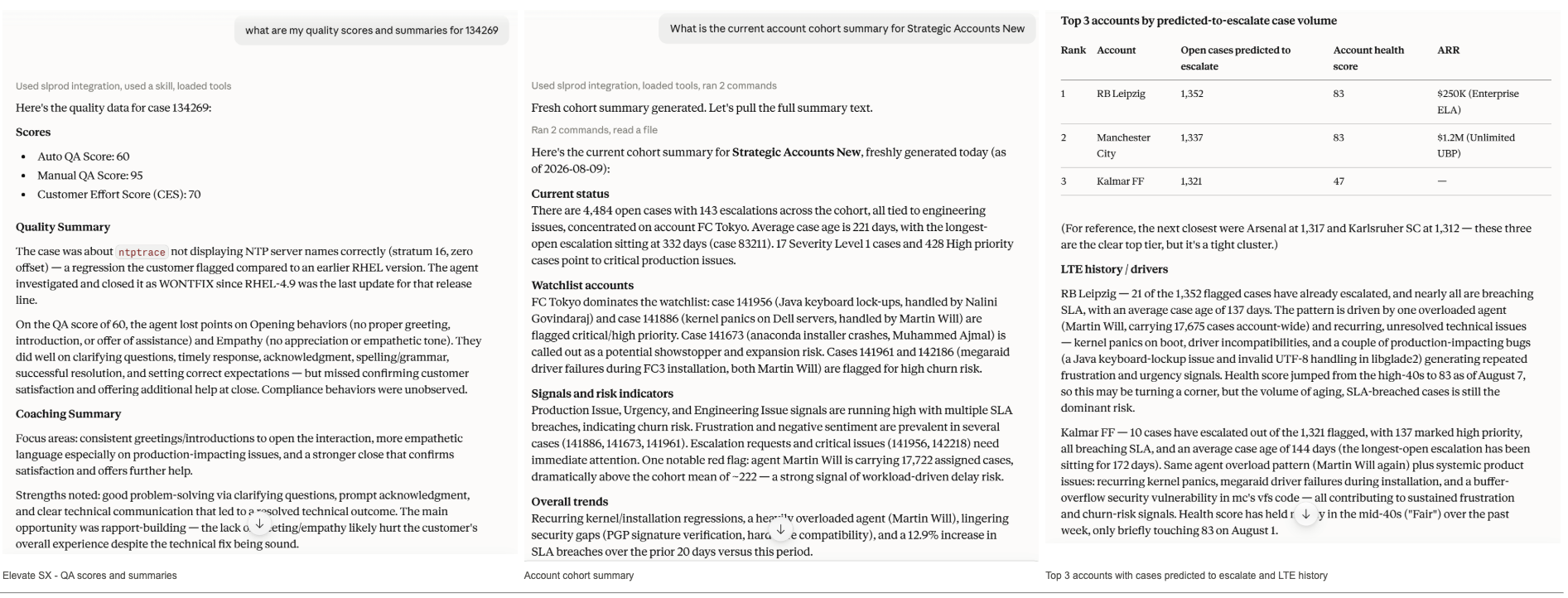
Building on our MCP server launch, SupportLogic's AI assistant integration now covers a broader set of case, account, and quality intelligence — giving teams access to cohort-level insights, richer escalation context, and Elevate SX quality data, all from within the same AI assistant they already use.
- AI assistants can now retrieve and generate case and account cohort summaries and pull account lists, so users can ask cohort-level questions — like trends across a group of accounts — without leaving their AI chat interface.
- Escalation queries now go deeper: assistants can surface escalation review status, prediction review state, escalation notes, and the factors behind an escalation prediction, giving a fuller picture of why a case was flagged.
- For customers using Elevate SX, the MCP server now also exposes quality and coaching intelligence — case-level QA scores and AI-written quality/coaching summaries, plus performance, strengths-and-weaknesses, and case-level QA views for an agent, team, or org — so quality insights are available wherever the team already works.
▎ New Alert Conditions: Scores and Case Metrics
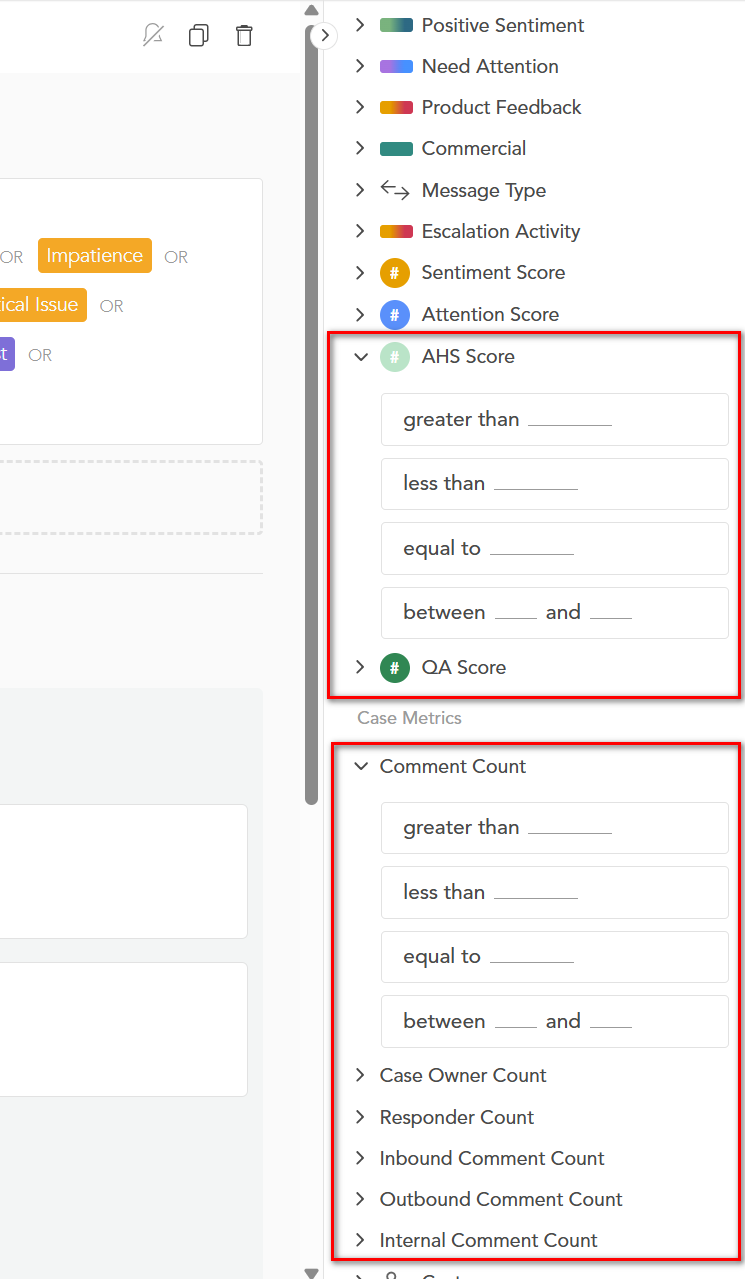
SupportLogic now lets you create alerts based on account health scores, case quality scores, and case activity metrics — giving teams earlier, more precise visibility into accounts and cases that need attention.
- New score-based alert conditions let you trigger alerts on the AHS (Account Health Score), QA Score, and CES Score, with QA and CES Score available for Elevate SX customers.
- New case metric conditions let you trigger alerts on Conversation Count, Case Owner Count, Responder Count, Inbound Comment Count, Outbound Comment Count, and Internal Comment Count.
- Every new condition supports four comparison types — greater than, less than, equal to, and between (a range) — so alerts can be tailored to the exact scenario you're monitoring for.
- Teams can catch account health issues sooner, surface quality or effort concerns automatically, spot unusual case activity such as comment spikes or too many responders, and combine new conditions with existing ones to cut down on alert noise.
- No new setup is required — the new conditions are available immediately when creating or editing alerts.
▎ Early Escalation Signs Signal
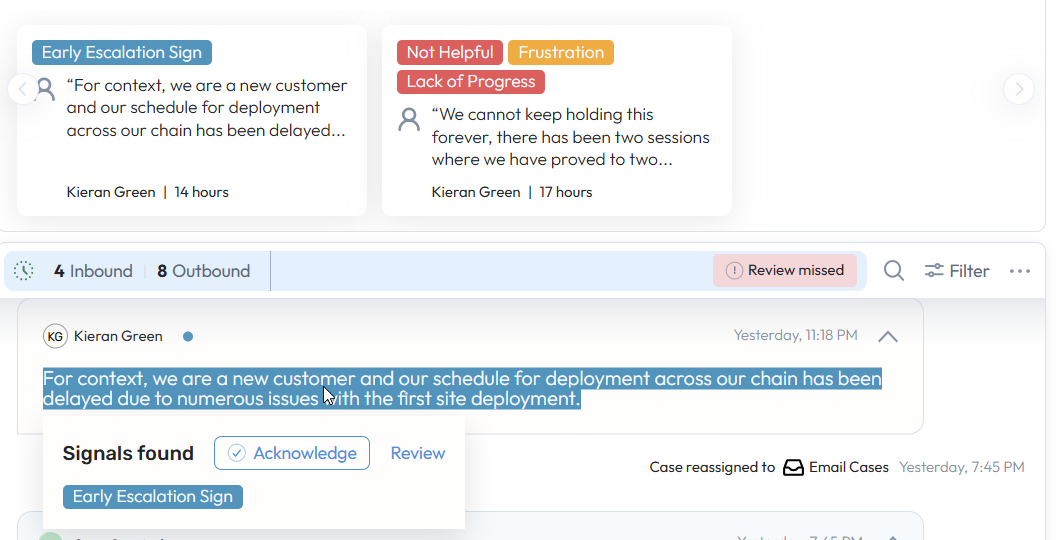
SupportLogic now surfaces early escalation warning signals on cases — identifying language patterns that historically precede escalations before a formal escalation is triggered.
- A new keyword-based labeler detects escalation-risk phrases in case comments, surfacing the "Early escalation signs" signal on cases where sentiment and language indicate emerging risk.
- The signal is surfaced under the Need Attention group alongside other signals.
- Support managers can act on flagged cases earlier in the lifecycle, reducing the likelihood of reactive escalation responses and improving time-to-resolution.
- Example phrases the signal was trained to recognize include: "the same issue occurred again," "this is currently blocked due to this issue," "this is affecting multiple customers," and "SLA breaches."
- No new setup is required to start seeing it on qualifying cases.
▎ Tag Cloud in Case & Account Cohort Summaries
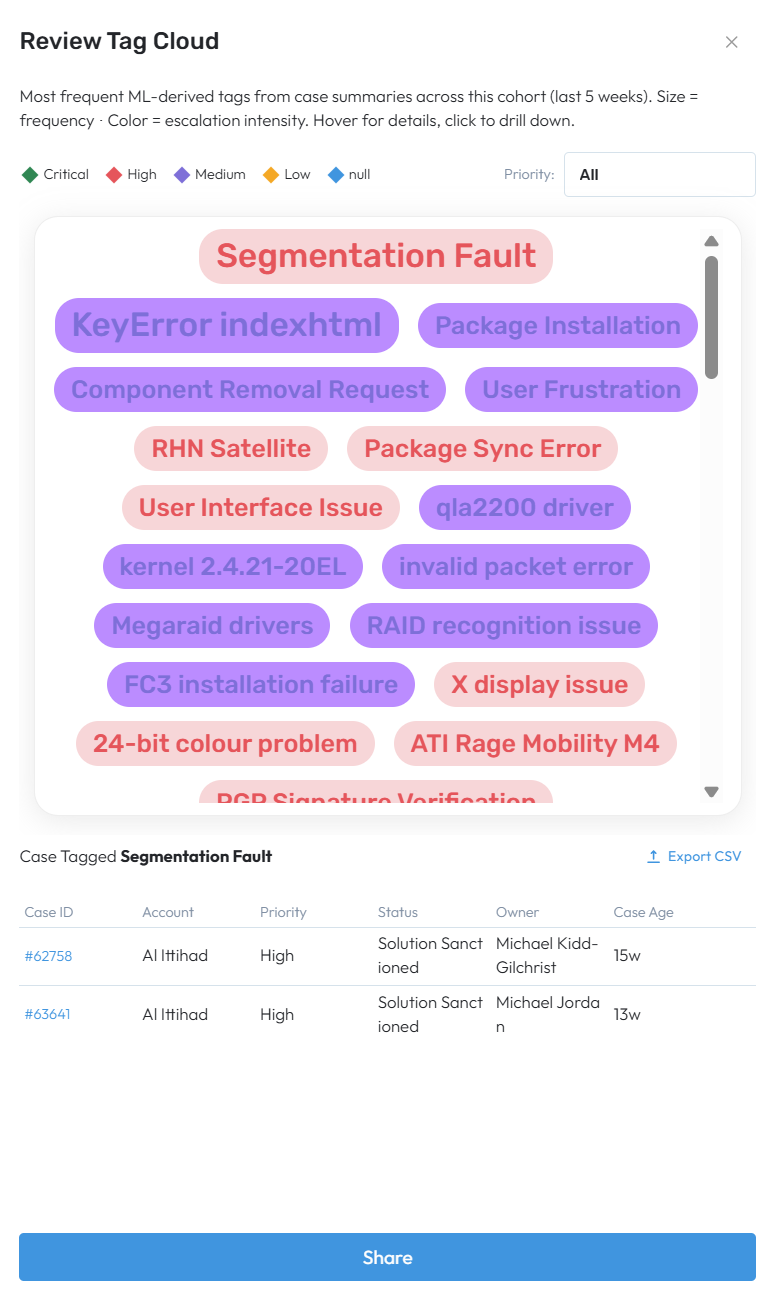
Spot recurring themes and emerging issues across a cohort at a glance with an interactive tag cloud built directly from your case and account summaries.
- A new Review Tag Cloud action now appears in the Possible Next Steps section of both Case Cohort Summary and Account Cohort Summary, surfacing the most frequent themes from the cohort's summaries — with tag size and color reflecting how often a theme comes up and how urgent the related cases are.
- Hover over any tag to see the exact number of cases where it appears plus quick context (for example, how many are escalated), then click through to a filtered case list showing account, priority, status, owner, and case age — so you can act immediately without reading every case.
- From the filtered list you can share it with an account owner or teammate, open individual cases, or export it — the same actions available elsewhere in Next Steps. The tag cloud always reflects the cohort's current lookback period and filters, and shows a clear message if tags aren't available yet for that cohort.
▎ Likely-to-Escalate (LTE) Coverage & Accuracy Improvements
We continue our efforts to increase Likely-to-Escalate prediction coverage and accuracy. In this release, Likely-to-Escalate now catches more of the clearest escalation-risk cases, giving customers earlier and more reliable warning of cases headed toward escalation.
- Cases that consistently show a stable, high escalation risk over time are now correctly surfaced as Likely-to-Escalate, rather than being under-flagged.
- Customers can expect roughly 2.5x more predictable escalations to be flagged going forward — an estimated 30+ additional escalations surfaced per month — giving more advance notice to intervene before a case escalates.
- Escalation recall on eligible cases is projected to improve by about 15–20%, making LTE a more dependable signal when prioritizing at-risk accounts.
Resolve SX
▎ Iframe Draft Response Confirmation Safeguard
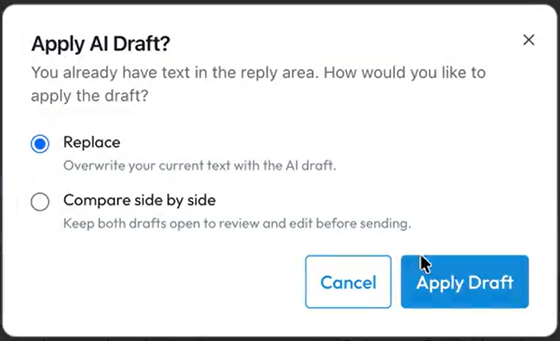
Case iframe Response Assist now warns before an AI-generated draft response overwrites text an agent has already started typing in the reply box.
- When a draft response is generated and the reply field already contains text, a confirmation prompt appears instead of silently replacing what was written.
- This prevents accidental loss of manually drafted notes or partial replies, giving agents more confidence using AI-assisted drafting alongside their own writing.
- The safeguard applies wherever draft generation is available, so the same protection carries across case types and channels.
Elevate SX
▎ New Elevate SX Tools Now Available in the MCP SL Solution BETA
Elevate SX has exposed several tools into the MCP SL solution, bringing quality insights directly into the tools your team already uses:
- Case QA Scores (Manual and Auto-QA)
- Customer Effort Score
- Gen AI Case-Level Quality and Coaching Summaries
- Agent, Team, and Org Performance Views
- Case-Level QA Views
Thanks,
The SupportLogic Team
Was this article helpful?
That’s Great!
Thank you for your feedback
Sorry! We couldn't be helpful
Thank you for your feedback
Feedback sent
We appreciate your effort and will try to fix the article