This month's highlights include a self-serve MCP connector sign-in flow, a wave of new MCP tools covering users, accounts, and Elevate quality data, Quality and CES scores now visible directly in the case iFrame, and a new "Call Promised" signal.
In This Release
New Features and Updates
Core SX
▎ MCP New Tools BETA
The SupportLogic MCP server now understands more about the users and account structures behind a request, not just case and ticket data.
- New tools let MCP resolve users and their profile details, and read a user's saved defaults — global filters, favorites, and customizations.
- A new Virtual Entities tool exposes virtual accounts, groups, and teams, so MCP can answer questions scoped to those structures.
- Additional tools round out this wave of MCP capability alongside the account- and user-level context added this release.
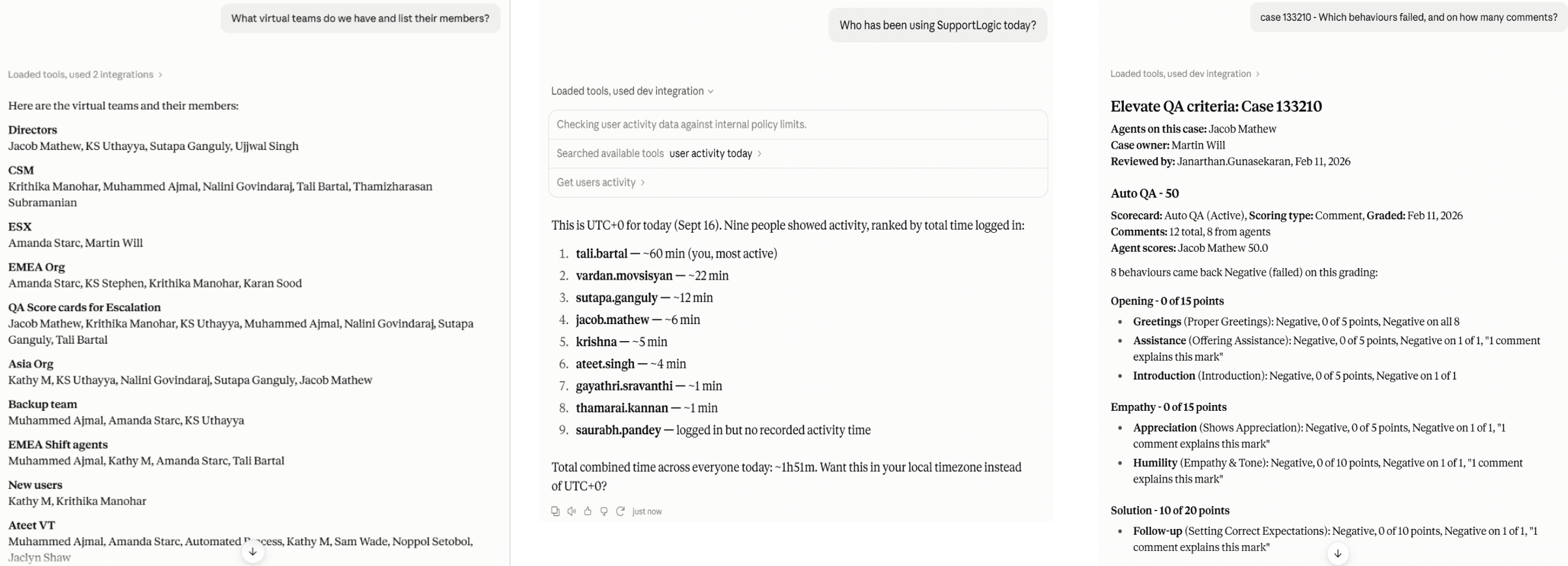
Core SX new tools:
- Get users info — resolves user identity from UI actions, e.g. who added an escalation note, performed an escalation review, or acknowledged a sentiment
- Get user settings — user role, permissions, and customization defaults (global filters, favorites, list setups)
- Virtual teams and accounts — full scope definitions for Virtual Accounts/Groups and Virtual Teams/Organizations
- Get users activity — per-user sign-in and usage activity over a time window, for measuring product adoption (not case work or performance)
- Get sentiments acknowledgement — who acknowledged which sentiment signal, on which case, and when, for measuring whether surfaced signals are acted on
- Get alerts report — delivered alert counts per rule, broken out by channel, for measuring whether configured alert rules are actually firing
Elevate SX new tool:
- Get case criteria — scored skills and behaviors breakdown for a ticket, with the list of scored agents
▎ MCP Connector: Standard OAuth 2.1 Sign-In
The SupportLogic MCP connector now uses a standard OAuth 2.1 sign-in flow, so it can be self-served instead of requiring setup help from SupportLogic.
- Connecting asks which SupportLogic workspace you're using, signs you in with your existing credentials, and shows a consent screen listing exactly what access you're granting.
- Your workspace is recorded in the access token itself, so every request is scoped to your organization and your own permissions — the connector can never see more than you can.
- No setup step from SupportLogic is required anymore, so you can add the connector yourself and be running in a minute.
▎ My Insights & Agent Insights: Case-Count Calculation Toggle
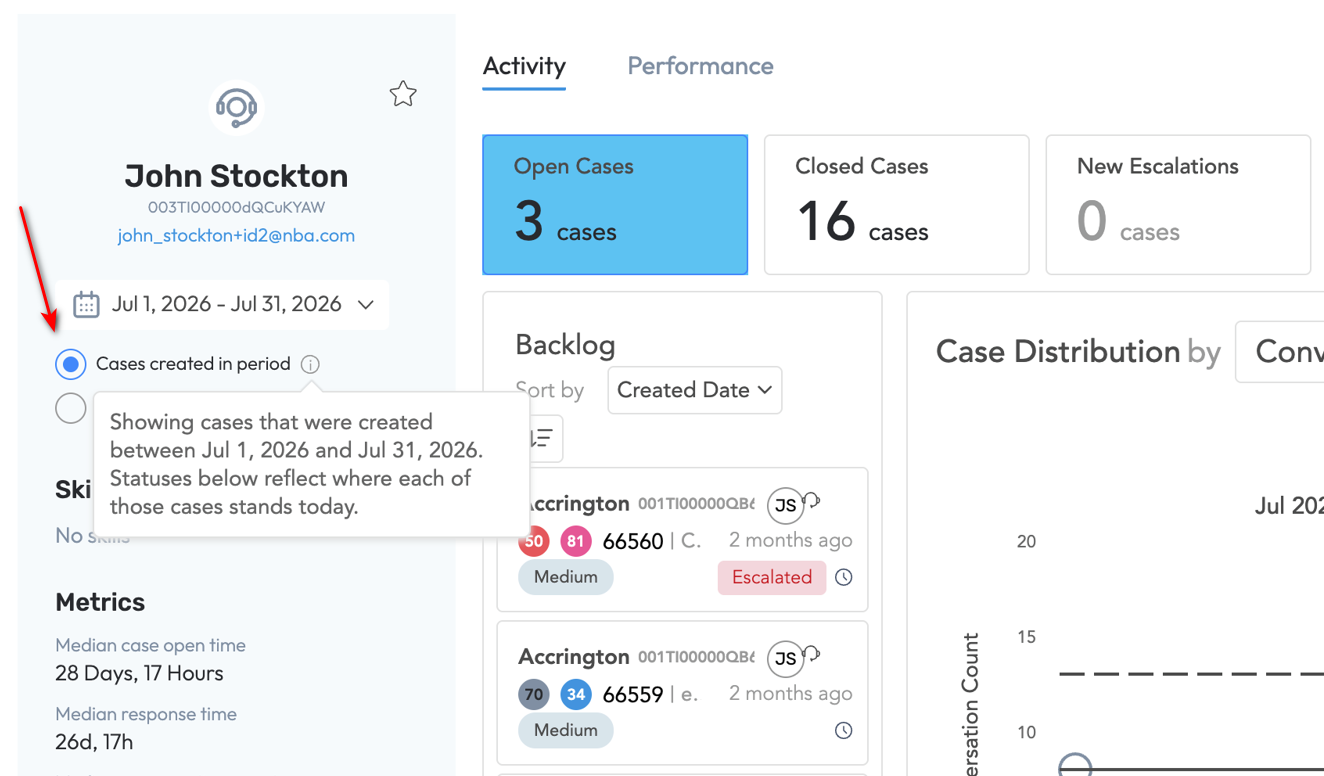
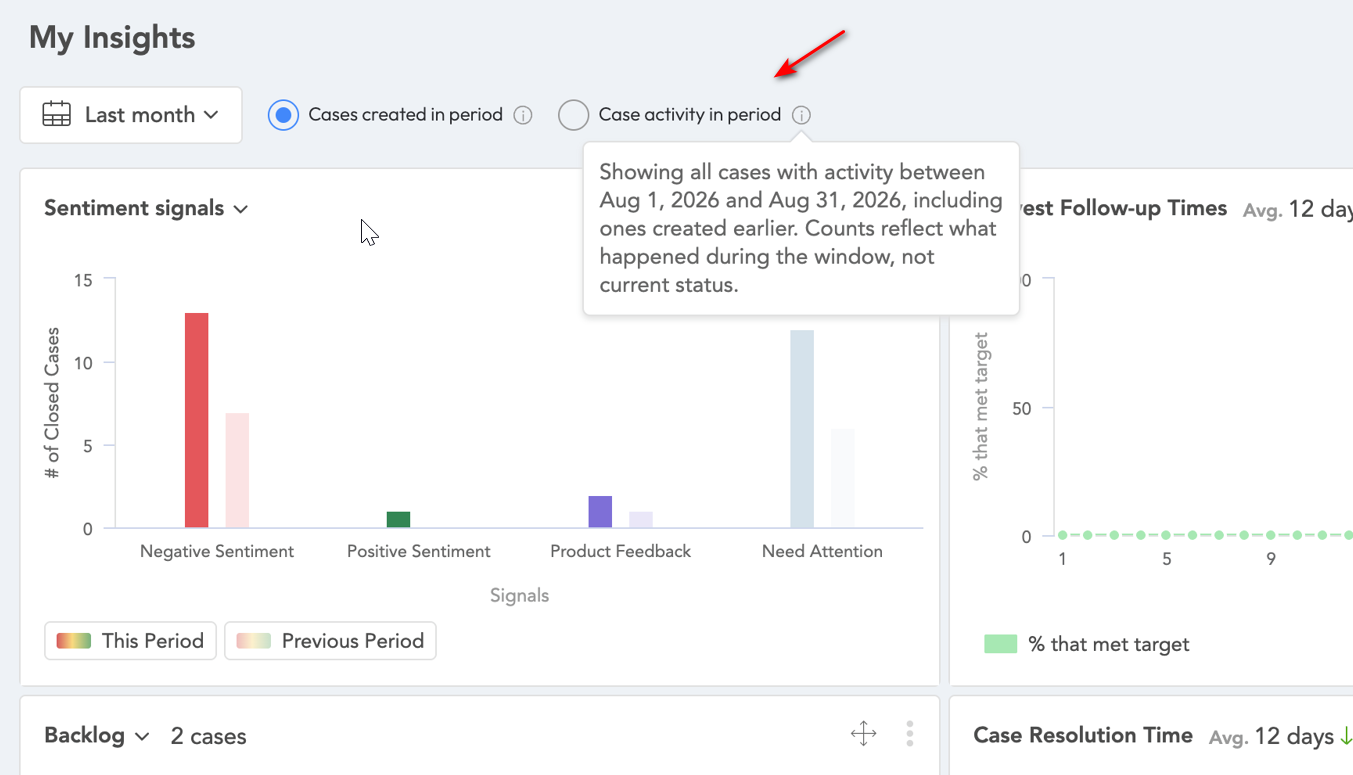
My Insights and Agent Insights now let users choose how case counts are calculated, instead of each page applying its own fixed logic.
- Users can toggle between "Cases created in period" and "Case activity in period" on both pages, so the same date range can be read either way.
- Previously the two pages used different calculation logic by default, which meant the same agent and date range could show inconsistent numbers depending on which page you were on.
- Existing defaults are preserved — My Insights still defaults to activity-based counts and Agent Insights to created-based counts — so no one's current view changes unless they switch the toggle.
▎ New "Call Promised" Signal
A new "Call Promised" signal has been added to the Need Attention signals group, detecting when an agent has committed to a call rather than when a customer has requested one.
- The signal recognizes a range of phrasing agents use to commit to a call — scheduling language, calendar commitments, and invite mentions — not just an explicit "I will call you."
- This closes a gap left by the existing "Call Request" signal, which only captures the customer asking for a call, not the agent's follow-through commitment.
- Teams can now alert on and track call commitments even when agents phrase them inconsistently.
Resolve SX
▎ Internal-Only Knowledge Filtered from Agent Assist
Agent Assist's "Explore Related Resources" panel no longer surfaces internal-only knowledge articles to agents.
- Articles tagged or titled as internal-facing (based on the
INTERNALprefix) are automatically excluded from the recommended-resources list. - This keeps agent-facing recommendations limited to content meant for external use.
- If you use a different prefix convention for your knowledge base, the available configuration can be extended to match that too.
▎ Distinct Icons for Article Linking and Copy Link in the iFrame UI
The paperclip icon in the iframe UI previously represented two different actions depending on the tab, causing confusion about what it would actually do.
- The Resolve tab and Knowledge tab each get a distinct, purpose-specific icon instead of sharing the same paperclip icon for Article Linking and Copy Link.
- Descriptive tooltips are added on hover so the action is clear even before clicking.
- This removes the ambiguity where the same icon triggered two unrelated actions depending on which tab it appeared in.
Elevate SX
▎ Addition of Quality and CES Scores into Case iFrame
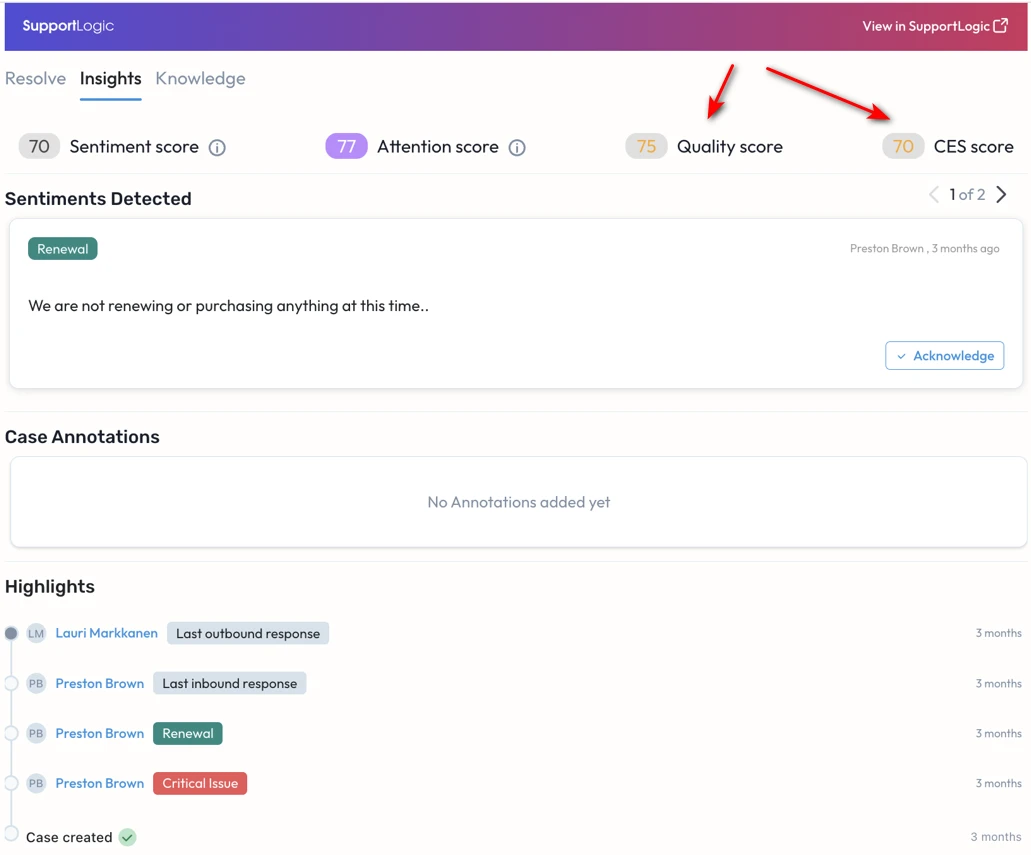
Customers on Elevate SX now see QA and CES scores directly in the case iframe, without needing to open Elevate SX separately.
- CES score appears on closed cases where CES data applies.
- QA score shows whichever is available — Manual or Auto QA — pulled directly from Elevate SX.
- When a case has both Manual and Auto QA scores, Manual QA is shown, since it reflects the reviewed, authoritative score.
▎ Elevate Dashboard Performance & Reliability
The Elevate SX dashboard has been rebuilt for speed and stability, fixing crashes and stale data that showed up under certain filter combinations, and now updates in real time instead of on a 6-hour refresh cycle.
- Filtering by status, skills, or behavior no longer causes the dashboard to crash or fail silently, and score and ticket-count totals now stay consistent across the dashboard, team view, and performance table.
- Dashboard widgets are now served from a single API call instead of three separate calls, cutting first-load time by roughly 30–40% in testing.
- Data refreshes in real time rather than every 6 hours, so support leaders see current Auto QA and coaching activity without a lag.
▎ Fairer Auto QA Scoring for Non-Voice Interactions
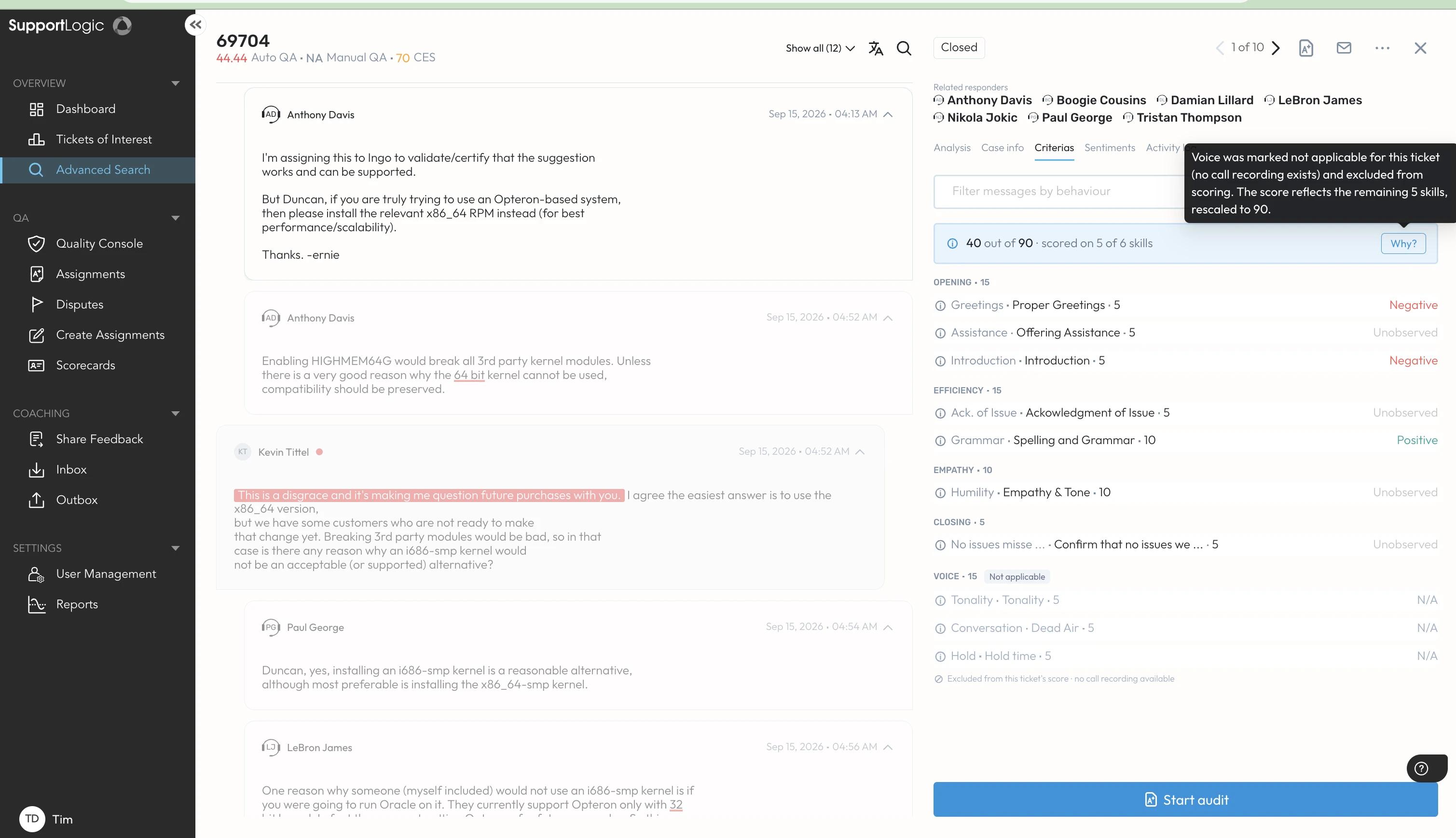
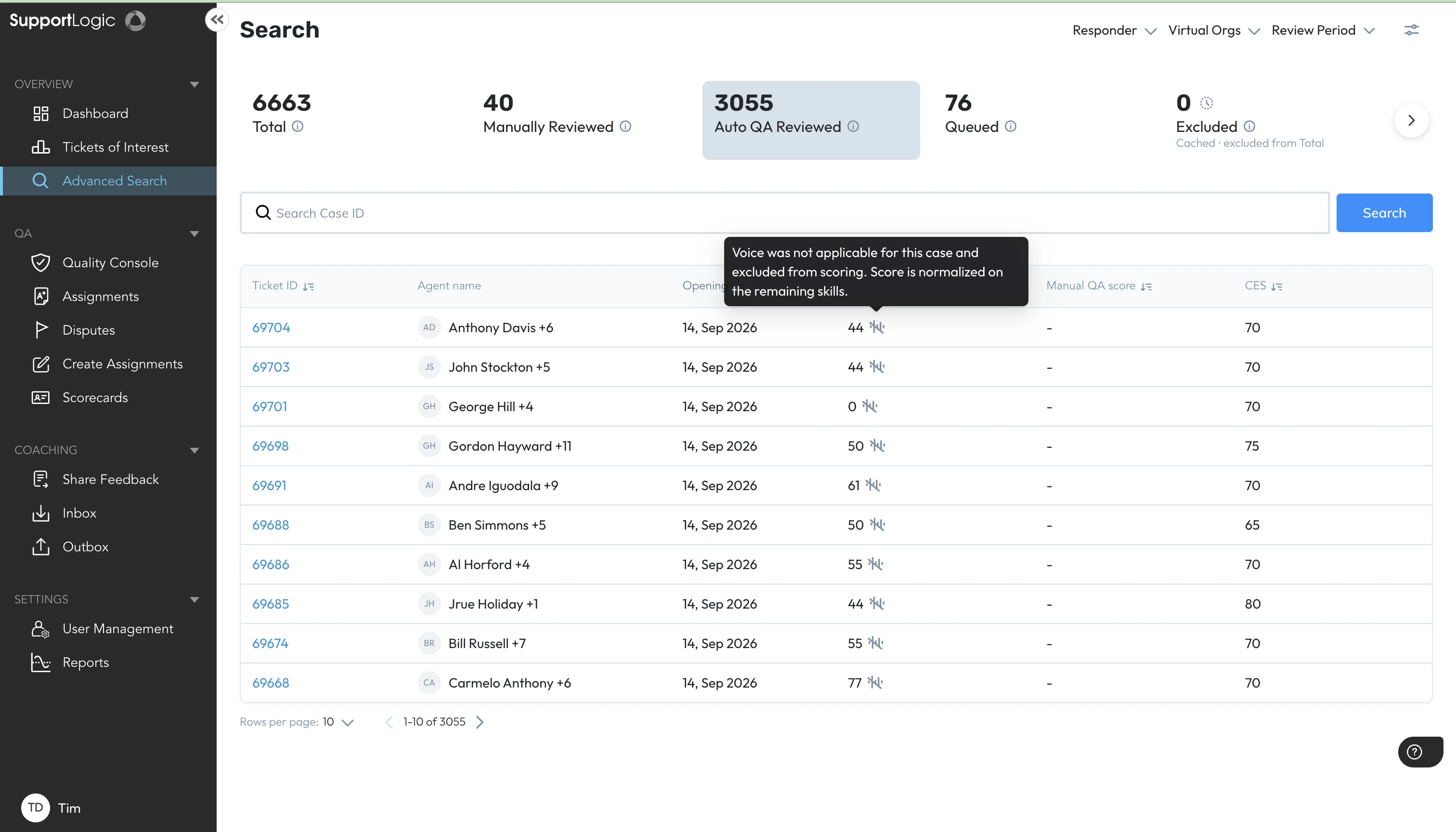
Auto QA no longer penalizes agents on voice-only quality checks — like hold time or tone — for cases that never had a voice component.
- Behaviors that only apply to voice interactions are now excluded from scoring on non-voice cases, and the total is renormalized across the criteria that do apply.
- The ticket view flags which behaviors were excluded and why, so reviewers understand why a score doesn't cover every category.
- Advanced Search results carry the same normalization indicator, so exported and searched scores match what's shown on the ticket.
▎ Configurable Delay for Auto QA Processing
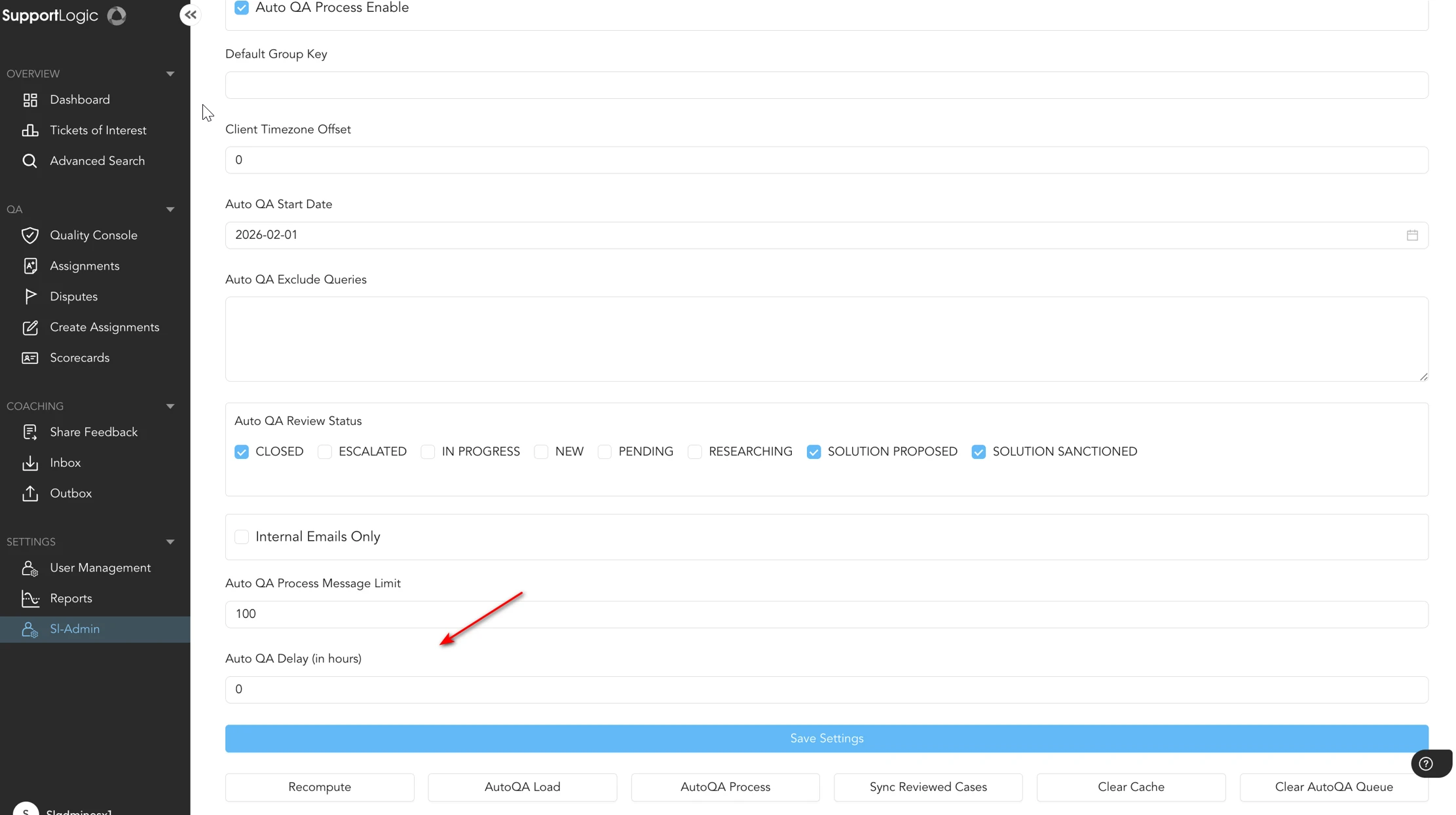
Auto QA processing can now be delayed after a case closes, so scoring waits for all case fields to finish syncing before it runs.
- For all customers, the default delay is 0 hours, so this has no effect unless explicitly enabled.
- For customers eligible for this delay, the default is set to 12 hours, giving custom fields time to finish syncing before scoring runs.
- The delay is adjustable from the SL-Admin page, so it can be tuned per environment as needed.
▎ MCP Server – Expanded Elevate Coverage BETA
The SupportLogic MCP server can now answer more of the questions support leaders ask about Elevate, without opening the Elevate SX interface.
- Teams can pull up a case's full quality breakdown — every skill and behavior checked, and how each was marked — directly through MCP.
- MCP can now identify who worked a case, which customer it belongs to, and each agent's individual score on it.
- This extends the first MCP release, which covered QA scores and AI summaries, to also cover ticket discovery, coaching feedback, and review status.
Thanks,
The SupportLogic Team
Was this article helpful?
That’s Great!
Thank you for your feedback
Sorry! We couldn't be helpful
Thank you for your feedback
Feedback sent
We appreciate your effort and will try to fix the article